Voucher badge: show in your session list what a camp costs with a voucher 06.11.2026
For operators, marketing, sales
Many operators give away vouchers in exchange for an email address, for example an early bird voucher requested through a form on their own website. The higher the voucher, the more attractive the offer - and the further the displayed price is above what families actually pay in the end. In the session list a camp then looks more expensive than it is. The new voucher badge closes this gap.
What it looks like
Below the price of a session a green dashed badge appears, for example "with voucher only 769.00 €". Bookacamp starts from the current price, that is after all automatically applied discounts such as an early bird discount, and subtracts the voucher amount. A camp with a regular price of 949 €, an early bird price of 799 € and a voucher of 30 € therefore shows 949 € struck through, 799 € in red and 769 € in the badge.
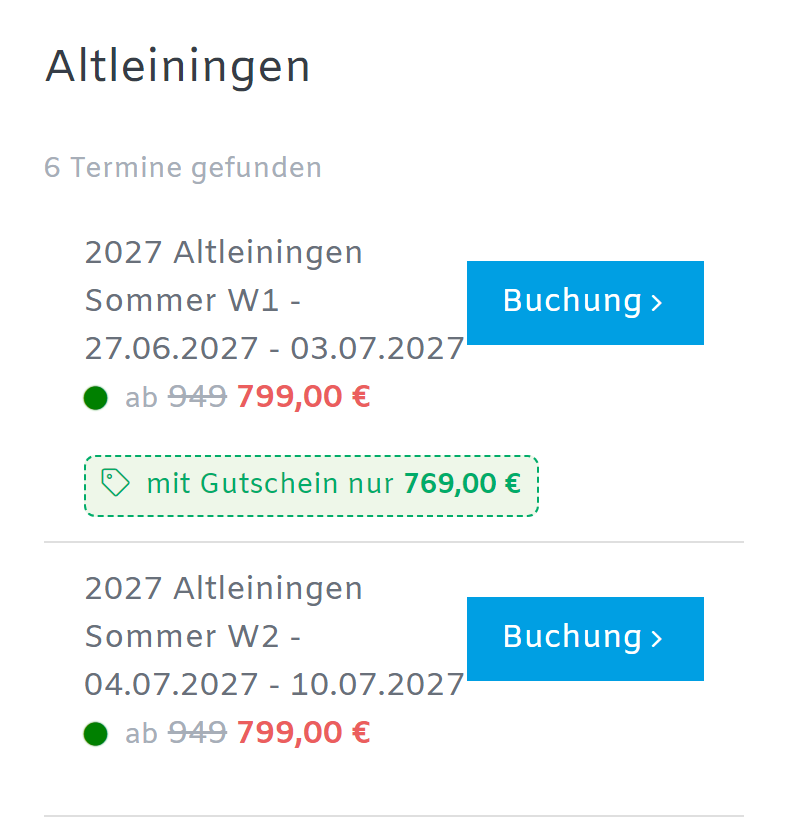
If you add a link, the badge becomes clickable and opens your voucher order page in a new tab. The session list stays open, so visitors can continue booking right after ordering the voucher.
Set it up at the session
In the session you find the section Voucher indicator under Expert mode > Upselling with two fields:
- Voucher amount: as soon as an amount is entered, the badge is shown. Without an amount everything stays as before.
- Link to voucher order: optional, the address of your order page.
Both values are taken over when you copy a session. If you offer one voucher for all camps, enter it once and keep copying as usual. Sessions on the waiting list or without free spots show no badge.
The voucher itself stays a voucher code
The badge is only a hint, it does not reduce the price. The voucher is redeemed as before: families enter the code in the booking form and get the displayed price. This also lets you give regular customers a higher code than the one shown in the badge - they see that they get more than everybody else.
Author: Mathias Methner