Continuously developed

Bookacamp News

On the following pages you will find our regular news and updates.

Free invoices as draft: check first, then book 12.11.2026

For administration and accounting

Not every invoice belongs to a booking. An invoice to a sponsoring body, the room rent for a seminar day or the settlement of a cooperation is written as a free invoice. So far a free invoice was booked as soon as it was saved. If you wanted to agree on it first or check it at your own pace, you had to take a detour via a group booking. Free invoices without a booking can therefore be saved as a draft, just like the invoices of a group.

How it works

  • In the Create invoice form, click Save draft instead of Create invoice with date above.
  • On the draft page you change recipient, items, cost center and invoice text as often as you like and look at the preliminary print via View draft as PDF, for example to send it for approval beforehand.
  • Once everything is right, choose the invoice date and click Create invoice with date above. The invoice takes the date from the form and keeps the number assigned to the draft, only the suffix "Draft" is dropped. Your number range stays without gaps.

In the invoice overview and at the customer, drafts are highlighted in yellow. A pen button leads back to the draft page, and a draft you no longer need can be archived right from the overview.

Drafts do not count

A draft is not an invoice yet. It therefore appears in no invoice export - neither in the Excel exports nor in the PDF bulk download, in DATEV or in Infoma. The revenue statistics and the discount evaluation count booked invoices only as well. This also applies to the drafts of group invoices.

Author: Mathias Methner

Link of this article

Voucher badge: show in your session list what a camp costs with a voucher 06.11.2026

For operators, marketing, sales

Many operators give away vouchers in exchange for an email address, for example an early bird voucher requested through a form on their own website. The higher the voucher, the more attractive the offer - and the further the displayed price is above what families actually pay in the end. In the session list a camp then looks more expensive than it is. The new voucher badge closes this gap.

What it looks like

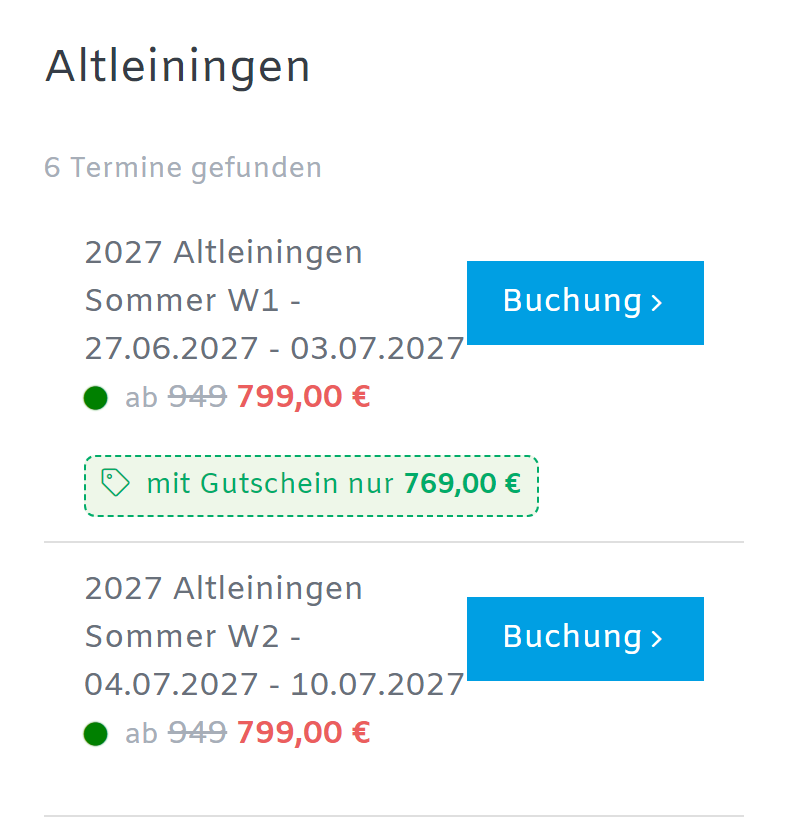
Below the price of a session a green dashed badge appears, for example "with voucher only 769.00 €". Bookacamp starts from the current price, that is after all automatically applied discounts such as an early bird discount, and subtracts the voucher amount. A camp with a regular price of 949 €, an early bird price of 799 € and a voucher of 30 € therefore shows 949 € struck through, 799 € in red and 769 € in the badge.

Screenshot session list with voucher badge below the price

If you add a link, the badge becomes clickable and opens your voucher order page in a new tab. The session list stays open, so visitors can continue booking right after ordering the voucher.

Set it up at the session

In the session you find the section Voucher indicator under Expert mode > Upselling with two fields:

  • Voucher amount: as soon as an amount is entered, the badge is shown. Without an amount everything stays as before.
  • Link to voucher order: optional, the address of your order page.

Both values are taken over when you copy a session. If you offer one voucher for all camps, enter it once and keep copying as usual. Sessions on the waiting list or without free spots show no badge.

The voucher itself stays a voucher code

The badge is only a hint, it does not reduce the price. The voucher is redeemed as before: families enter the code in the booking form and get the displayed price. This also lets you give regular customers a higher code than the one shown in the badge - they see that they get more than everybody else.

Author: Mathias Methner

Link of this article

Quality audits: submit further documents and settle questions per question 04.11.2026

For associations, offices, reviewers and audited companies

In a quality audit a lot comes down to single questions: a proof is not sufficient, a document is missing, the office knows more than the documents show. Until now this often meant returning the questionnaire to the company or sending information back and forth by email. With this update, request, proof and feedback all happen right at the question.

Several documents per question

Audited companies upload as many documents to a question as they need, several at once as well. Every further upload extends the list and replaces nothing. Until now a replaced file was lost. Files uploaded by mistake can be removed as long as the questionnaire has not been submitted.

Submit further documents without reopening the questionnaire

If a proof is not sufficient, the reviewers leave a remark on the question that the company can see. The company can add further documents right there, even if the audit has already been submitted. All other answers stay unchanged. Reviewers and the office get an email, and the timeline of the question shows what was added.

Office and reviewers in conversation

The office can give the reviewers feedback on every question, for example when a proof arrived by mail or a fact is known from earlier audits. These comments are always internal and never visible to the company. On request the reviewers get an email. Internal comments are marked with their own icon in the overview, so everybody sees at a glance what the company can see and what not.

Safely to the final review

  • Reopen questions: A question marked as reviewed can be reopened without reloading the page and edited right away.
  • Filter on open questions: The filter reflects every change immediately, reviewed questions disappear from the list.
  • Open questions at a glance: Before giving your OK and before finalizing, the final dialog shows how many questions are not marked as reviewed yet.
  • No empty comments: Comments without content are not saved, so no empty emails go out either.

Author: Mathias Methner

Link of this article

Previous year comparison: how well is your session booked compared with last year? 04.11.2026

For operators, sales, management

"Is the second summer week doing better than last year?" The question sounds simple but was hard to answer. Looking at the same date of the previous year does not help, because the summer holidays start on a different day every year. Comparing March 2026 with March 2025 compares sessions that are a different number of days away from their start. The new previous year comparison in your statistics solves this.

The anchor: the same holiday week, the same number of days before the start

For every session Bookacamp finds its counterpart of the previous season: the session in the same week of the school holidays - "summer holidays, week 2" of 2026 against "summer holidays, week 2" of 2025, no matter on which day the holidays begin. Outside the holidays the same calendar week counts. If a camp runs several sessions in parallel, for example for different age groups, Bookacamp tells them apart by their code, even if the code contains the year.

Both sessions are then compared the same number of days before their own start: if your session has 34 bookings 40 days before it begins and its counterpart had 30 bookings 40 days before its start, you are booked 13 % faster than last year.

What the overview shows

Under Statistics > Previous year comparison you see your upcoming sessions or a whole season, grouped by camp:

  • the booking pace as a traffic light: green when you are ahead of the previous year, red when you are behind
  • booked spots today and of the counterpart at the same point in time - if the capacity changed, the utilisation is compared
  • new bookings of the last 7 days, next to those of the previous season in the same period
  • a forecast of the occupancy at the start and the day the session is expected to be fully booked
  • on request the mean of the last three seasons, so a single unusual year does not distort everything

A click on a session opens its booking curve: the booked spots day by day before the start, overlaid with the curves of the last seasons. The key figures are also part of the analysis of every session.

You stay in control

If the counterpart found automatically does not fit, pick the session of the previous season yourself on the booking curve page. Your choice is kept. When you copy a session of the previous year, Bookacamp remembers it and uses the copy as a hint. If your camp is located in another federal state than your customers, set at the camp whose school holidays the comparison follows.

With dynamic pricing: align prices with the booking pace

If you use dynamic pricing, your rules get a new condition: booking pace compared with the previous season. You set from which lead the price rises, for example from 10 %, and optionally in which period before the start the rule applies. So that a single booking does not drive the price, you also enter how many bookings the previous season needs for the comparison. As with the capacity rule, a raised price is kept when the pace drops again later.

Good to know

The previous year comparison is available in the statistics of every account, there is nothing to switch on. Bookacamp reconstructs the booking curves of past seasons from the booking and cancellation dates, with this update the state is also saved every day. Waiting lists, rebookings and deleted bookings are not visible in the reconstructed curves, the daily values are exact.

Author: Mathias Methner

Link of this article

Commission credit notes: settle agency commission when it suits you 30.10.2026

For operators, accounting, management

If you work with agencies, you know the question: deduct the commission directly on the invoice or settle it separately later? The deduction makes invoices harder to read, and settling later often means lists and manual work. With the commission credit note, the invoice to the agency stays complete, while Bookacamp keeps a ledger in the background from which you create the credit note with one click.

Set it once on the agency

In the agency settings, choose the new option Commission credit note as the calculation base, enter the net commission percentage and decide whether the credit note is created with 19 % or 0 % VAT. The percentage applies to all parts of the invoice: base price, accommodation, transfer and additional services. Insurances and installment surcharges are not part of the calculation base.

The ledger keeps track

From the switch onwards, every issued invoice of a booking or group of this agency records its commission: single invoices, group invoices, collection invoices and free invoices of a booking. Free invoices without a booking or group are left out. If something changes later, nothing is overwritten:

  • Cancelled invoice: The commission is reversed exactly, even if it was credited already. The correction is settled with the next credit note.
  • Collection invoices: Bookings which already have their own invoice are left out, so the commission is not recorded twice.
  • Commission already deducted: Bookings from before the switch keep their deduction until you renew the invoice. Until then the ledger records no commission for them, so it is not paid out twice.
  • Cancellation fees: Invoices for cancellation fees earn no commission. If you want to pay the agency commission on them as well, enable the option Commission on cancellation fees in the agency settings.

Settle when and what you want

In the agency list and in the agency itself, the item Commission settlement leads to all open entries. There you filter by sessions (all, past, current and future) and by invoices (all or fully paid only). For example, you can settle only the trips which already took place and are paid.

One click creates the credit note as PDF, with its own running number, all items per invoice and the VAT shown. The credit note stays as it is, even if something changes afterwards. If you made a mistake, you cancel it with one click and the entries are open again.

Good to know

The ledger starts with the first invoice after the switch, older invoices are not recorded afterwards. The credit note needs the tax number or VAT ID of the agency, the settlement page points it out if it is missing. Credit notes are part of the DATEV export: they are posted to the debtor of the agency and the expense account from the DATEV settings, split by VAT rate and cost center. A cancellation appears as a separate reversal. They are not passed on to other accounting interfaces.

The existing options stay as they are: if you want to keep deducting the commission on the invoice, you do not have to change anything.

Author: Mathias Methner

Link of this article

AI visibility: see how ChatGPT and others read your offers 25.10.2026

For operators, marketing, management

More and more families and teachers no longer look for a holiday camp or a class trip on Google alone. They ask ChatGPT, Claude, Perplexity or Gemini: "Which language camp on the Baltic Sea still has places in the summer holidays?" Whether your offers show up in that answer was invisible so far. Your statistics now show it in the new section AI visibility.

Four numbers you did not have before

Under Statistics, right after the page views, you see for the last 30 days how often AI services opened your offer pages - split by the reason:

  • AI assistant fetch: a person asked an AI assistant about an offer and the assistant read your page to answer. Every one of these fetches stands for a real question of a real person.
  • Visitor from AI assistant: a person clicked your link in the assistant's answer and landed on your page.
  • AI search index: your pages are indexed for the search of AI services so that answers can cite and link them.
  • AI crawler: your pages are collected to train language models.

A chart shows the course per day, so you can see whether interest picks up at the start of the season or after a price change.

See per session which offer is in demand

The table of the most visited sessions and the camp overview have a new column AI. It counts per session the fetches by AI assistants, AI search and AI crawlers plus the visitors who came from an AI assistant. You see which trips the AI services know and send people to - and which offers are still missing there.

What to do with the numbers

If your offers are hardly read, make them readable for machines. In the section for integrating your offers you find Structured data (JSON-LD), a ready-made interface that returns your sessions with title, date, location, age range and price in the format search engines and AI services understand. Embedded on your own website, ChatGPT and others find the right facts instead of outdated texts from comparison portals.

Good to know

The numbers come from the identifier AI services send with each request and from the link visitors arrive by. No personal data is stored, only counters per day and session. If your booking form is embedded in your own website, Bookacamp only recognises visitors from an AI assistant when they land directly on the booking page - a path through your home page stays invisible to us.

The section is available in the statistics of every account, there is nothing to switch on. Counting starts with this update, so the numbers grow day by day.

Author: Mathias Methner

Link of this article

Sharing: let parents bring you the next booking 2026-10-24

For operators, marketing, office

The best moment for a recommendation is the one right after the booking worked out. The anticipation is there, the child is sitting next to the parent, and the question "which week are the others from school going to?" is in the air anyway. That is exactly where the sharing add-on puts a recommend button: on the confirmation page, right after the registration.

One tap, and the offer is in the class chat group

Below every registration on the confirmation page there is a row with three ways: WhatsApp, copy link and email. If the device offers its own share menu, a fourth button appears that also reaches Signal, Threema or the photos app. All of them sit next to each other, there is no menu to open first - one tap is enough.

WhatsApp receives a finished message: "I registered with you - here you can register as well", including the link. It is written and sent by the parents themselves, in their own chat, to the people they would have asked anyway.

What the recipient sees

The link leads to a page in your account with a single subject: the offer. Image, title, dates, location, duration, price, free spots - and a booking button that goes straight into your booking form for exactly that session. If the session is booked out or over by then, the page says so and leads on to your offer overview instead of into a dead end.

In WhatsApp, Signal or iMessage a preview card appears before anyone clicks, carrying your image, your offer title and your name - not a grey line with a bare address, and not the Bookacamp logo either. In a chat group that card is what decides whether anyone clicks at all.

Groups and your own team recommend you as well

The button is not limited to a family registration. After a group booking - a programme group or a hotel group - it sits on the confirmation of the group, and the wording follows: "We booked with you - here you can book as well." The teacher who booked the class trip passes the offer on to the parallel class or to a colleague at the next school.

For a programme offering the page shows what a group needs to know: duration, group size, age range and price, plus a button that leads straight into the request. Fixed dates and free spots are deliberately absent - a group brings its own period.

And whoever joins your team usually knows someone else who would do the same. After a teamer application the same button sits on the confirmation, this time with "I applied at you - here you can apply as well". The link leads to your application form, never to the application of the person who shared it. For finding counsellors that is the cheapest channel there is: a recommendation from someone who already knows the job.

What is not shared

The link carries no personal data. No name, no address, no booking number, no access key to the booking. The address contains a random key that points to the shared offer and nothing else - whoever receives it sees the offer and that is all. Who recommended what to whom appears nowhere on the page.

Forwarded links stay harmless that way: a link passed around a chat group twenty times leads twenty times to the same offer and never to another family's registration. If a link should stop working, switch sharing off in your account - the links already sent go quiet with it.

Your customers send it, not we

There is deliberately no field where someone types the email address of a befriended family so that the system sends them a recommendation. In Germany such a mail counts as advertising by the operator and is not permitted without the consent of the recipient, no matter that a third party triggered it. So sending stays where it belongs: in the messenger and the mail program of your customers. You get the reach without carrying the risk.

Switching it on

You activate the sharing add-on under account settings → sharing. There you switch the add-on on and decide separately whether the recommend button should appear in the booking system and whether it should appear in the teamer add-on - the two areas work independently, so you can start with one of them. Switching an area off takes the links already sent from that area down with it. Your embeds on your website stay unchanged - they are the same links as before.

Author: Mathias Methner

Link of this article
Look at the new booking form before you switch your account 2026-10-23

For operators, office, marketing

A new booking form is a matter of trust. It is the page where your customers spend money, so nobody wants to switch without having seen how it looks with their own trips, their own services and their own colours. That is what the preview is for: you append a parameter to a link of your booking form and walk through the new version, while everything stays as it is for everyone else.

One parameter, no switch

Take any link of your booking form and append ?booking_form_version=2. The form opens in the new layout - with your real sessions, prices, accommodations and additional services. The setting in your account stays untouched, and everyone using the normal link still sees the familiar form.

The parameter stays with you through the steps: services, participants, the person registering, summary and confirmation page - all in the version you are looking at. It works the other way round as well: with ?booking_form_version=1 you look at the classic form even when your account already runs the new one. That way you can compare both in two browser tabs.

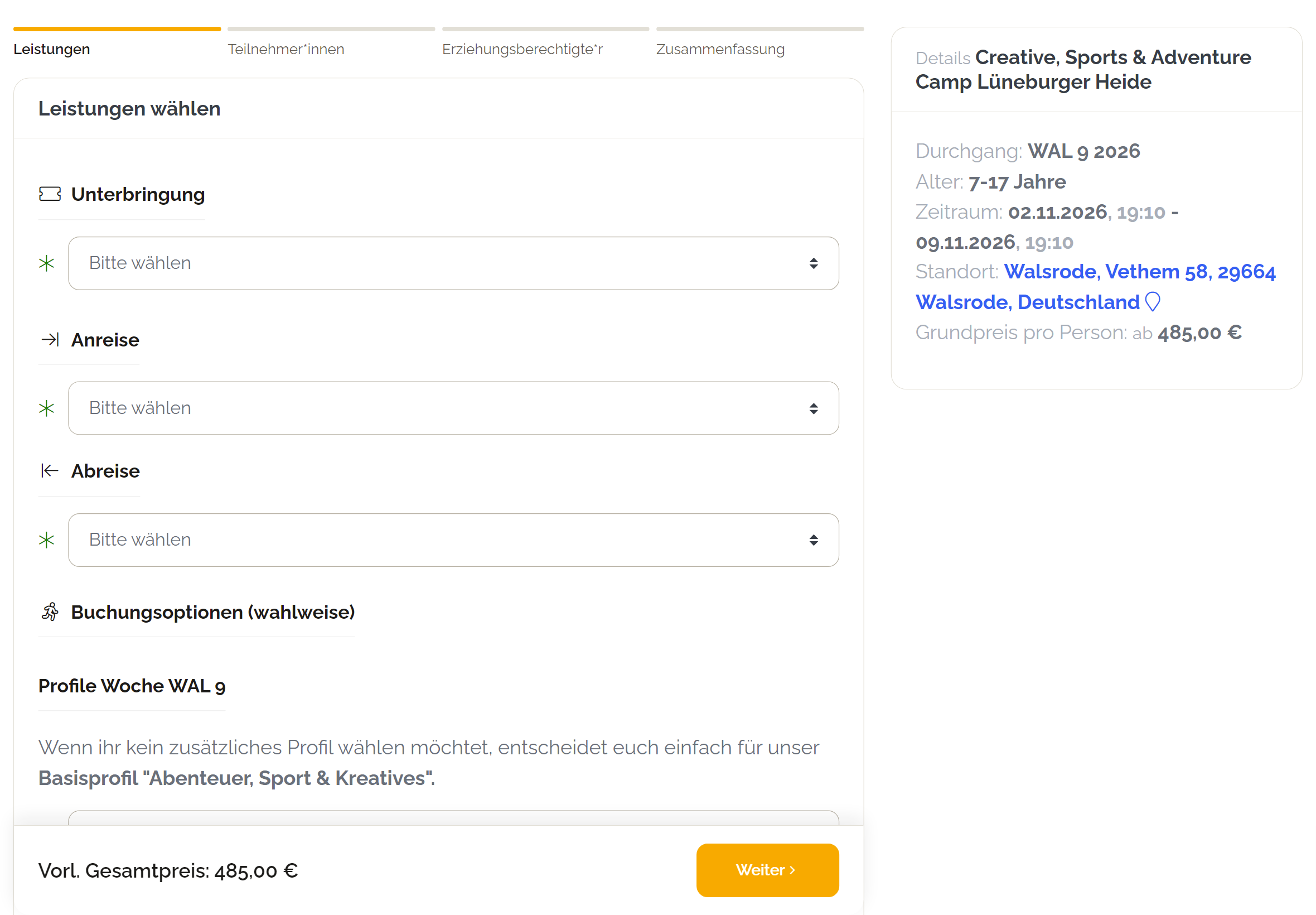
This is what the new booking form looks like:

Screenshot of the new booking form

What is different in the new version

The booking is split into clear steps, and a step indicator always says where you are and what is still to come. The services come first: accommodation, arrival and departure, additional services are chosen before the details of the participants and the person registering. So whoever books knows the price of the trip right from the start.

At the bottom an action bar follows along: it carries the preliminary total and the next button - on a phone always visible, without scrolling. The fields are larger, the services are built to be tapped, and the details of the trip sit in a collapsible card on a smartphone instead of a long column. On a desktop they stay as a sidebar next to the form.

Nothing changes about your data: same fields, same mandatory entries, same confirmation emails, same bookings in the backoffice. It is the same booking, only guided differently.

Switch when you are ready

Once the preview has convinced you, switch your account to version 2 under account settings → booking system → public settings. The hint about the preview parameter including an example link is right there, so you do not have to look for it. The switch applies per account and can be taken back at any time - your embeds on the website stay as they are, they are the same links.

The new layout is available for the booking forms for children and youth, for adults and families, for events and tickets, for group and program offers and for hotel bookings. A few special forms still run classic - which the preview shows you right away.

Author: Mathias Methner

Link to the article

Booking after the start: negative booking deadline 2026-10-15

For courses, holiday care and multi-day offers

With the forward time you decide until when a session can be booked. A value of 24 means: bookings are possible until 24 hours before the start, then the booking form closes. So far, the start was the latest possible moment.

For many offers that does not fit. A course running over several weeks, a five-day holiday care or a camp where latecomers may still join on the second day: here families should be able to book even after the first day.

Negative values allow bookings after the start

Enter a negative forward time and the session stays bookable beyond its start. With -48, for example, bookings are possible up to 48 hours after the start. All other checks remain: if the session is fully booked, unpublished or archived, nobody can book.

  • For all sessions: in Settings, Booking system, Sessions, field Forward time.
  • For a single session: when editing the session in Deadlines and cancellation. This value takes precedence over the account setting.

Positive values work as before. So you can keep single sessions open after the start and stay with the usual deadline for all others.

Author: Mathias Methner

Link to the article

Sign in to the backoffice with a passkey 2026-10-03

For all backoffice users

Passwords get forgotten, reused or typed into fake pages. A passkey replaces the password: you sign in the way you unlock your phone or laptop - with your fingerprint, face recognition or the device PIN. For the Bookacamp backoffice this sign-in can be enabled per account.

Why it is more secure

  • The passkey stays on your device and never leaves it. Bookacamp only stores a public key that nobody can sign in with.
  • A passkey only works on bookacamp.de. On a fake sign-in page your browser does not even offer it - phishing comes to nothing.
  • Owning the device plus fingerprint or PIN are two factors in a single step. If your account made two-factor authentication (MFA) mandatory, a passkey fulfills that requirement as well - you do not need an authenticator app then.

How to set it up

First a main user enables the sign-in: in Settings, section Security, tab Passkey. Then every person sets up their own passkey in their profile under Manage passkeys. Your browser asks for fingerprint, face or PIN, and the passkey is saved.

To sign in, enter your user name as usual and click Login with Passkey. If you have access to several accounts, you choose the one you want afterwards. Signing in with the password remains possible.

No fingerprint reader on your computer?

That is no obstacle. On Windows the Windows Hello PIN is enough. Alternatively use your smartphone: the browser shows a QR code, you scan it with your phone and confirm there. Security keys such as a YubiKey and password managers from Google, Apple, 1Password or Bitwarden work as well.

Device lost?

Main users can remove the passkeys of a person in the user management. The person then signs in with their password and sets up a new passkey on the new device.

Author: Mathias Methner

Link to the article

Room assignment for groups: place large groups with a few clicks 2026-10-03

For property operators, group travel

A school trip with 100 people arrives, and everybody needs a bed in huts, tents or rooms. So far that meant assigning room after room, each time picking the number of people, accommodation, room and gender. The automatic assignment was faster, but it liked to spread the group over the whole site or to mix areas that do not belong together. The new room assignment solves both.

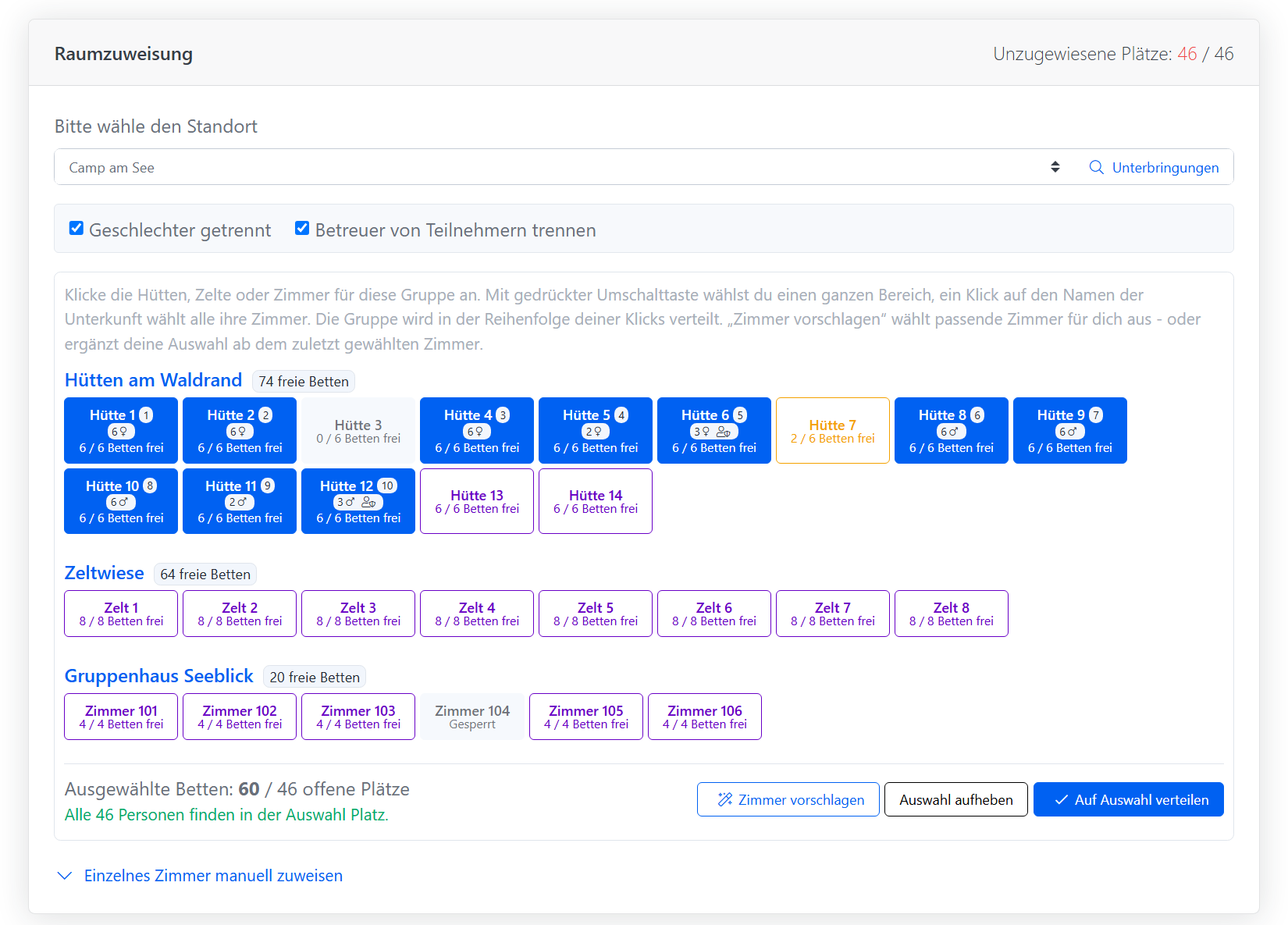
Screenshot room assignment for groups

Every accommodation as a tile

In the room assignment of a group you see every sleeping room of the location as a tile, grouped by accommodation and sorted the way they stand on site. Each tile shows the free beds during the group's stay. Full and blocked rooms are greyed out, partly occupied rooms are highlighted.

  • A click picks a hut, a tent or a room.
  • With the shift key you pick a whole range, for example hut 1 to hut 12.
  • A click on the accommodation name picks all of its rooms.

The group is placed in the order of your clicks. That way it ends up exactly in the accommodations next to each other instead of being scattered across the site.

Let Bookacamp suggest rooms

It gets even faster with Suggest rooms. Without a selection, Bookacamp suggests suitable rooms of the booked accommodation. If you already picked a room, the suggestion adds the next free neighbouring rooms from there until everybody fits. Rooms where other guests already sleep are left out. For a large group three clicks are enough: first hut, Suggest rooms, Assign to selected rooms.

See who sleeps where before saving

With every change of the selection Bookacamp calculates the distribution in advance. Each picked tile shows how many people move in and whether they are girls, boys or supervisors. Below, you see whether everybody fits or who is still left without a bed.

This matters because gender separation and separate supervisor rooms need whole rooms: a single female supervisor takes a hut on her own, even if it has six beds. Enough free beds therefore does not mean everybody fits. The preview shows you before you save, and you can add rooms or turn off a separation.

Special cases stay possible

For exceptions there is still the manual assignment of a single room with a fixed number of people and gender, for example two teachers in a particular room or a seminar room. It folds out below the tiles.

The automatic assignment, for example from the occupancy scheduler, got smarter as well: when a group needs several rooms, it fills free neighbouring rooms one after another instead of always the biggest ones first. It no longer uses seminar, sports or kitchen rooms, and rooms with other guests only come into play once no free ones are left.

Author: Mathias Methner

Link to the article

Session overview with season tabs 2026-09-29

For operators, website

If you offer many camps with many dates, you know the problem: on your website Easter, summer and autumn dates are listed all mixed up. Interested families usually look for the next holidays only, yet they have to scroll through the whole list. With a large offer it is easy to lose track.

The new card view with season tabs sorts your camps by season. Clearly visible tabs at the top of the page, such as Autumn, Easter and Summer, show the number of dates each. One click shows the camps with exactly the dates of that season.

Only seasons with bookable offers

A tab is only shown if the season contains at least one bookable date. Past or fully booked seasons therefore disappear on their own. A visible tab still lists every date of its season, fully booked ones with the usual notice or waiting list.

The order follows the next bookable date: the upcoming season is the first tab and is shown right away.

Where does the season come from?

You maintain it on the session under Expert mode > Filter / Topics in the group Season: spring, Easter, Pentecost, summer, autumn or winter. A session with several seasons appears in each matching tab. Sessions without a season are listed in the tab Further dates, so nothing gets lost.

Integration

The link and the iframe code are in the integration guide (globe at the top of the menu) under Card - Grouped by camp and season. The view works like the familiar card view by camp, including label filters in the link. For example, the label 2027 shows only next year's dates, neatly split by season.

Author: Mathias Methner

Link to the article

Request documents for a single booking 2026-09-28

For operators, office

Whoever checks eligibility for a subsidy collects a lot of different records: salary statements, notices from the job centre, proof of rent, insurance certificates. Which of them a family actually needs depends on their situation. The upload page, however, used to show every document you collect at all - twenty and more for some operators. Families had to work out for themselves what applied to them.

With requesting per booking the office decides which documents a family is shown. The upload page then offers exactly those.

Select and send

On the booking details page you open Request documents from the email menu. You see a list of all documents with checkboxes: mandatory ones are preselected, and documents that were already delivered or requested are marked. Next to it the email is shown for preview, just like for your other messages.

After your confirmation the family receives an email listing the requested documents - so they know what it is about while reading, without opening the link. The upload link stays valid and documents can be handed in later at any time.

Ask for more, or take it back

If a record turns out to be missing later, you simply request it as well: the new request is added to the existing ones, while documents already handled stay as they are. If you requested something by mistake, you can take it back in the document panel of the booking as long as nothing has been uploaded.

The follow-up list gets more precise

With requesting enabled, the list of missing booking documents counts only what you actually asked for. Bookings nobody has requested anything from no longer clutter your list.

How to switch it on

So nothing changes without your consent, requesting is an option: you find it in your account settings under Booking system in the Documents tab. Without it every document is offered for upload as before. Which documents exist at all is still configured under Administration > Requirements.

Author: Mathias Methner

Link to the article

Radius export: every customer around your location in one list 19.09.2026

For operators, marketing

A new camp starts, a location still has free places, or you invite to an open day - news like that matters most to families living nearby. Until now you had to pull the master export and filter the addresses by zip code in Excel.

The radius export does this for you: choose a location and a radius, and Bookacamp delivers every customer living within that distance as an Excel list.

Choose a location, click a radius

You find the export under Exports > General in the custom exports. The selection lists every location Bookacamp knows the position of - from its map coordinates or its zip code. Below are five buttons for 10, 30, 50, 100 and 200 km. One click downloads the list.

A clean list for your newsletter tool

The list contains title, salutation, first and last name, email address, zip code, city, the distance to the location and the date of the last booking. It is sorted by distance and can be imported straight into newsletter tools like Mailchimp, Brevo or CleverReach.

  • Customers with the same email address appear only once.
  • Addresses on the blacklist or the newsletter blacklist are left out - whoever unsubscribed stays unsubscribed.
  • Customers without an email address and anonymized records are not part of the list.

How the distance is calculated

Bookacamp measures the air-line distance between the location and the center of the customer's zip code. No addresses are sent to external services. German zip codes are considered; customers from abroad are not included.

A note on advertising emails

Advertising emails require the consent of the recipient or, for existing customers in Germany, the requirements of § 7 (3) UWG: you advertise your own similar offers, you pointed out the advertising when collecting the address, and there is no objection. You find this note right next to the export as well.

Author: Mathias Methner

Link to the article

DATEV export per invoice number range: every sender gets its own batch 18.09.2026

For operators, group accommodations, accounting

With invoice issuers you bill different customers under different senders, each with its own invoice number range if you like. Such a sender often comes with its own bookkeeping as well - a separate company, a separate client at the tax office. Until now all invoices and payments still ended up in one shared DATEV export, and your accounting had to sort them apart by hand.

The DATEV export therefore splits the records by invoice number range automatically. Every number range is exported as an own DATEV batch and can be imported straight into the right client.

One batch per number range

The export distinguishes three cases:

  • Your default number range from the account settings forms one batch, as before.
  • If the group suite has an own invoice number range, its invoices get an own batch.
  • Every invoice issuer with an own number range gets an own batch as well. Issuers without an own number range stay in the default batch.

Every batch comes with its own file of business partner master data. The file names carry the prefix of the number range, and in DATEV the name of the issuer appears as the name of the batch. So when you import, you see right away which file belongs to which client.

Payments go into the same batch as the invoice they belong to. That keeps the receivable and the incoming payment together at the same client, and the open items balance out.

An own client number per number range

To make sure every batch reaches the right client, you can store an own DATEV client number per number range: for an invoice issuer right in its form, for the group suite in the settings under Accounting. If you leave the field empty, the client number of your account settings is used.

In the backoffice and in the automation

The split applies to the financial accounting export in the backoffice just as much as to the DATEV automation. In the backoffice the list shows the number range of every record, and a note above the list names the batches with their client numbers. The automation still sends one single email - with all batches attached.

Nothing changes for everybody else

If you do not use any further number ranges, you get exactly the same export as before: one file, the same file name, the same client number. The split only concerns the DATEV export - the interfaces to Axians Infoma and Navision stay as they are.

Author: Mathias Methner

Link to the article

Invoice issuers: bill different customers under different senders 11.09.2026

For operators, group accommodations, accounting

Many operators do not invoice everything under the same name. Class trips for international schools run through one company, holiday camps through another - each with its own address, its own bank account, its own tax number and ideally its own invoice numbers. Until now every invoice carried the sender from your account settings, extended by the details maintained for the group suite. Anyone who needed more senders had to run separate accounts.

With invoice issuers you maintain as many additional senders as you like within one account and decide for every invoice who issues it.

One issuer, recorded completely

Every issuer gets an internal name under which it appears in the invoice form, plus its billing address, its bank details and its tax information such as tax number, VAT ID, commercial register and executive directors. Address, bank details and tax information are mandatory - an issuer is always recorded completely, so no invoice is ever created with half a sender. Details that depend on the legal form, such as the register of associations or the supervisory board, stay optional.

You find the administration in the administration menu under Invoice issuers and as a link in the settings under Accounting, both in the general account settings and in the group suite.

Chosen right when the invoice is created

When you create a custom invoice or edit a group invoice, an additional section Invoice issuer appears. That is where you choose who issues the invoice. The default is Default (account settings) - if you choose nothing, you invoice exactly as before. The section only appears once you have created at least one issuer; for everybody else the form stays as it is.

Group invoices start out as drafts. You can switch the issuer as often as you like until the invoice is issued, and the invoice always picks up the current choice.

An own number range per issuer

If you like, an issuer gets an own invoice number range with its own prefix. Its invoices are then called REINT2026-201, REINT2026-202 and so on - they are counted on their own without gaps and do not move the rest of your numbering. Every prefix has its own counter, so two issuers never share a number sequence.

As soon as the first invoice of a number range has been issued, the prefix can no longer be changed. That keeps the numbers unique. An issuer that has already issued invoices can no longer be deleted, but it can be archived - it is then no longer offered for new invoices.

Cancellations stay with the same sender

Cancellation invoices, cancellation fees and draft copies take over the sender of the original invoice automatically and stay in the same number range. So when you cancel, you do not have to keep track of which issuer the invoice once ran under.

Issued means issued

All sender details are stored on the invoice when it is created - just as has always been the case for the recipient address. This applies not only to invoices with a chosen issuer but to every new invoice. If you later move, change your bank or correct an issuer, invoices that have already been issued no longer change retroactively. The PDF, the e-invoice and the invoice view in the customer portal always show the sender the invoice was issued with. That is in line with the German principles of proper bookkeeping (GoBD) and saves you explanations during an audit.

Invoice issuers are managed by the main user of your account.

Author: Mathias Methner

Link to the article

Program availability search: groups only see the offers that still have room 26.08.2026

For operators, group accommodations, office staff

A teacher is looking for a house for 24 pupils plus two accompanying adults, somewhere between Easter and the summer holidays. Your website shows the catalogue: attractive program offers, prices, descriptions. What it does not show is whether anything is free in her window at all. So she sends a request - and you reply that this particular offer is fully booked in exactly that period. Next offer, same game.

The new program availability search turns that order around: the group states its frame data first, and the website then only shows offers that can actually host it.

Frame data in, matching offers out

The search form asks for two things: the group size - participants and accompanying adults, each by gender - and the possible travel period, meaning the window the trip may fall into. That is all. One click on search, and below it the program offers appear that have room for the group somewhere inside that window, each with its base price, travel duration, age range, the earliest possible arrival and the accommodations that fit. If several arrival dates are possible, that is shown as well.

What matters just as much is what does not appear: offers whose accommodations are booked out for the entire period never show up in the first place. The group never asks for something you would have to decline anyway - and you save yourself the reply.

Availability yes, bed counts no

The search works on the same data as your occupancy view in the backoffice: existing bookings, reservations, room assignments, blocked periods and disabled weekdays all feed into it. None of that is communicated to the outside though - the group only sees that an offer is possible for them, never how many beds are still free. If you need the exact numbers for a sales conversation, the calendar view in the backoffice is still the place to look.

The travel duration is respected too: an offer running five days only appears when all four nights are free in a row and the complete stay fits into the given window.

Heavily booked? Straight to you, then

If your settings allow fully booked periods to stay bookable upon request, such an offer does not disappear - it is marked as heavily booked instead. In place of the booking button, your phone number and e-mail address appear right inside the card, with the name of the offer already in the subject line. The group ends up in a conversation instead of in a form that would not go through anyway.

From the result straight into a prefilled booking form

When the group clicks a free offer, the familiar booking form opens - but with the group size already filled in, and the availability calendar starting in the period the group searched for. Nobody has to enter the same information twice.

Integrated the way you know it

You find the ready-made iframe code in the backoffice under Programs → Integration as the new entry Programs availability search - copy it, put it on your website, done. As with the other integrations you can narrow the selection down with labels, for example to class trips only or to a single region.

The availability search is available to everyone working with program offers.

Author: Mathias Methner

Link to the article

Work record overview: every counselor, every day, one table 28.07.2026

For operators, office staff, accounting

Anyone who has to hand counselor working hours over to accounting used to pull one PDF per person and add up the weekly hours in their head or in a spreadsheet. With five counselors that is tedious, with fifty it costs an afternoon. The new work record overview takes that step off your desk: one table, everybody in it, totals included.

Pick a range and a session, the table is there

You find the page in the backoffice under Teamer → Overviews → Work record overview. At the top you choose a date range and optionally a session. Below it the matrix appears: counselors on the left, the individual calendar days across the top, the time worked on that day in the cells. Every week is followed by a subtotal column, the far right holds the total per person, and the footer adds up each column across the whole team.

Pick a session and the table also lists the counselors placed in it who have not logged anything yet. An empty row is therefore as informative as a full one - you see at a glance whose entries are still missing before you settle the invoice.

Overnight weeks add up correctly

Many camps start on a sunday. Counted in calendar weeks, that arrival sunday falls into the previous week and the weekly total is wrong. The overview therefore builds its weeks as seven day blocks starting at the selected start date: pick the arrival sunday as the start and the block runs from sunday to saturday, with the sunday counted in. Pick a monday and you get the classic calendar week. The split is your call, not a fixed rule.

Approved or pending - visible per day

Every day cell also shows whether that day's entries are already approved (green check) or still pending (hourglass), and whether they have been locked. Locked entries can no longer be changed - once you have reviewed a week you freeze it and hold a reliable state for accounting.

PDF for accounting

One click on the PDF button exports exactly the current selection: one landscape table per week and, at the end, a weekly summary of person by calendar week including the grand total - the sheet you hand on. The familiar per-counselor PDFs are still there and now carry a subtotal after every calendar week.

Not using the teamer addon yet?

This overview is one building block of the teamer addon - and whoever is not using it yet is doing a lot of this by hand. The addon accompanies your counselors along the whole way: online application with questionnaire, selection including interview scheduling and rating, placement planning with counselor ratios and availabilities, contracts and mandatory documents such as the criminal record certificate, trainings with invitations and attendance lists - and a dedicated profile login where your counselors confirm placements, upload photos, write daily reports and, of course, log their working hours.

Instead of applications by e-mail, placement plans in spreadsheets and working hours on paper you have everything in one place - on the same data Bookacamp then feeds into occupancy, room planning and invoicing. Talk to us, we are happy to enable the teamer addon and walk you through the start.

The work record overview is available to everyone who has the work record feature enabled.

Author: Mathias Methner

Article link

Tips for the running season: what helps while your camps are under way 2026-07-21

For operators, back office, camp management

In the middle of the season there is rarely time to explore the system. Yet that is exactly when the cases show up that never occur in winter: someone leaves early, a place suddenly frees up, the travel documents need to go out. We have collected the functions that help most while your camps are actually running.

When things do not go to plan

If someone has to end their trip early, record it on the booking via Other actions › Journey abort. The booking gets its own aborted status, and the detail page shows the date and the reason — properly documented, while the full travel price remains chargeable. If someone cancels outright, you can attach a cancellation fee during cancellation, for individual bookings and collective registrations alike. And if that frees up a place, fill it straight from the waiting list; the system remembers when the booking e-mail was sent so it does not go out twice.

Bookings once a session has started

The internal booking form (top of the page, next to the search field, behind + Book) lets you add participants to sessions that have already started or were never published. Because it can override capacities and session settings, this form is meant strictly for your back-office team — the link does not belong in customers' hands.

If someone switches session or location at short notice, remember the service group after rebooking: it stays on the original variant and can be adjusted via Edit booking. Otherwise the person shows up in the wrong programme in the daily occupancy. Answers to free questions — photo consent, permission to travel home alone, swimmer or non-swimmer — can be added at the same place at any time.

Communication and payments

In the booking module, the travel documents filter lists every booking that has not yet received the documents e-mail — tick, send as a batch, done. For short-notice information such as a changed meeting point, send a free e-mail text to the selected bookings and optionally put a colleague in CC.

Under Booking balance › Pending payment you find every booking that has not been paid in full. You can filter by days until the session starts and send payment reminders and dunning letters as a batch from there. If an amount has to go back after the trip, create a voucher code with a fixed or percentage value under Templates › Discounts, mark it as selectable in the back office only and apply it via Edit booking — and do not forget create a new invoice at the bottom of the page.

Keeping an overview on site

Under Locations › Daily Occupancy you see every running session for a location and date: booked services, capacity per accommodation category and the participants with arrival and departure, room number and preferred room-mate — exportable to Excel. For the team on site there are participant lists as Excel and PDF exports; if you have issued a profile login for counselors, your crew can access them straight from their phones. The kitchen plan sits under PMS › Kitchen, including a free note field for special requests that fit no category.

Rooms are assigned in the workload scheduler by drag and drop, and the automatic assignment takes over most of the work on request. For arrival there is a QR-code ticketing system embedded directly on the invoice, and your counselors can mark bookings as checked in or checked out from the profile login. Every booking also holds up to three emergency contacts — it pays to export those lists before the start in case connectivity on site is poor.

The classic: "I cannot log in"

When customers or counselors report that their login does not work, it is almost always because they landed on the sign-in page for back-office users. Customers and counselors have their own access; you find the link for your company at the top right under the globe icon, in Integration. The rule of thumb for support cases: if there is no logo on the sign-in screen, they are at the wrong door.

And if something does go wrong: type @BookacampSupport into the note field of a booking, write your request behind it and save the note — a support ticket is created automatically in the background, including a reference to the record. No more hunting for booking numbers.

Author: Mathias Methner

Link of the article

Google Begin Checkout event: the booking funnel becomes measurable 09.07.2026

For operators, marketing

Until now, Bookacamp reported to Google Analytics whenever a booking was completed successfully - the purchase event. What was missing: the start of the journey. How many prospects even open a booking form? And how many of them actually book in the end? That is exactly the gap the new begin checkout event closes.

Sent when a booking form is opened

The moment a guest opens a booking form, we send the official GA4 e-commerce event begin_checkout to your website - carrying the same product information you know from the purchase event: session code, title, price and currency. Google Analytics therefore attributes both events to the same product.

Funnel and remarketing without extra effort

Because begin_checkout and purchase form a standard funnel, Google Analytics shows the drop-off rate of your booking form right in the e-commerce reports - no custom configuration needed. And in Google Ads you can build audiences from it, such as "started a booking but did not finish" for targeted remarketing.

The event is activated with a single switch in the account settings under Tracking. As with all tracking features: we send nothing if the guest's browser signals Do Not Track.

Author: Mathias Methner

Article link

Bucket room assignment: drag unassigned participants straight into rooms 09.06.2026

For operators, house management, planners

The table-based room assignment in the daily occupancy view is great when you want a proposal generated automatically and only need to confirm it. Sometimes, though, you simply want to plan by hand: who goes into which room with whom? For exactly that there is now an additional, standalone page - the bucket room assignment. It does not replace the table; it sits next to it as a second way to plan.

Buckets instead of rows

On the left, one big bucket holds every participant not yet assigned to a room - each with name, age, accommodation category and session. On the right, every available room is its own bucket. Drag a person into a room to plan them in. A participant can only be dropped into rooms of their booked category, so misplacements are impossible.

The room thinks along

The moment someone lands in a room, the room shows whether it is a boys, girls or unisex room, how many beds are taken - and the average age of its occupants. At a glance you see whether the group in the room fits together. Two filters above the buckets help you sort: show only boys or girls rooms, and hide full rooms.

A click on Save assignments writes the current state as a real room allocation - capacity check included. The feature is available immediately and rolls out automatically to every operator. This feature shows its strength where the actual physical spaces are stored in the object.

Author: Mathias Methner

Article link

Discount analytics: which voucher actually moved the needle, broken down to a single session 31.05.2026

For operators, marketing, sales

Up to now, the discount overview answered the question which discounts do we offer - but not which ones actually got used. To find that out you opened the bookings list, filtered by discount, and counted by hand. The new Discount Analytics page does the counting for you and goes one step further: every discount can be drilled down to the exact sessions on which it was redeemed.

One page, two tables, the full picture

The top table lists every discount that has ever been applied - title, type, validity, number of bookings, and the total amount that left your invoices because of it. Sort by amount and the cash-relevant voucher campaigns sit on top. The summary cards above the table show how many discounts are in active use and the grand total of money discounted across the entire business.

Drill from total to a single session

Click the filter icon on a discount row and the second table snaps to that discount - one row per session that redeemed it, with booking count, total amount, camp, agency and the date range. Combine with the agency, camp, label and type filters to answer questions like "How much did our family-camp discount cost us in the summer holidays?" in two clicks instead of building a manual report. Cancelled bookings keep their place in the count but contribute zero to the sum, so the figure on screen matches the money that actually left the till.

The page is reachable directly from Manage discounts > Analytics and rolls out automatically for every operator.

Author: Mathias Methner

Article link

Teamer room assignment: counselors land in the workload scheduler, so you know how many beds are really free 28.05.2026

For operators, house management, planners

Booking participants have always lived in the workload scheduler - but counselors? They slept in the same rooms, took up the same beds, and were nowhere to be seen on the occupation overview. So "how many rooms can we still book?" was a question the system could never answer honestly. With the new teamer room assignment, that gap is closed.

New lane in the workload scheduler

Under Planned offerings > Teamer a third lane joins the existing Camps and Groups rows. Every counselor with an active placement on a session that runs at this location shows up there with a T badge, ready to be dragged into any free room. Their attendance date range comes straight from the session - no extra typing - and the very same drag mechanic you already know from guest attendances handles the room change.

Capacity counts honestly

Once a counselor is dragged into a room, that bed counts toward the room's occupation just like a paying guest's would. The "available beds per accommodation" line under the scheduler therefore reflects the real picture - the number you see is the number you can still book. The drop into an over-booked room is rejected with the same notification participants use, so no invisible double-bookings.

The feature is available immediately and rolls out automatically to every operator.

Author: Mathias Methner

Article link

Work record for teamers: log working hours from the profile login 20.05.2026

For operators, team leaders, counselors

Many tour operators have long asked their teamers to write down start, end and pause times somewhere - on paper, in shared sheets, in chat. With the new work record in the counselor profile login, that workflow finally moves into Bookacamp itself. Teamers log every working day from the same login they already use for their photo uploads and placement confirmations, and the office sees the resulting hours directly on the teamer detail page in the backoffice.

What the teamer enters

One record per day: date, start time, end time, pause in minutes, an optional session the work belongs to and a free-text note. The system computes the worked hours server-side from start, end and pause and stores them next to the entry - so the same number shows up on every screen and in the PDF without any client-side math.

Leaders can manage their team

A counselor whose skill assignment for a session is marked as leading gets an extra "Team work record" page. From there they pick one of the sessions they lead, see every teamer placed in that session and can add, edit or delete work records for any of them - useful when a teamer forgot to log a day or when the leader does the daily wrap-up for the whole team. The leader role is checked on every save against the current placements, so trust does not depend on a client flag.

Summary on placements and in the backoffice

The existing "Historical work protocol" panel on the teamer's placements page gets a sister card "Work record summary", showing per year the number of records, distinct days worked and total hours. The exact same summary also appears on the backoffice teamer details page next to the existing worked-protocol card - driven by a shared snippet, so the numbers stay identical between the counselor's own view and the office view.

A4 portrait PDF with logo and signature area

From both sides - backoffice and profile login - a button generates an A4 portrait PDF with the tour operator's logo in the header, a table of every recorded work day, a totals row and a signature block for the teamer and the supervisor. The PDF is the artefact you hand over for reimbursement, audits or simply for the teamer's own records.

Activated by access right, opt-in per teamer

The feature is gated by a new access restriction Access to work record. Existing teamer logins do not get it automatically; you enable it in the access management UI for the teamers you want to roll the feature out to. The database schema is designed so that backoffice staff users can be added as record owners later without a migration - that path is not in the user interface yet.

The feature is available immediately and must be enabled by our support

Author: Mathias Methner

Article link

Right-of-withdrawal form for private customers 19.05.2026

For operators, end customers

With § 356a BGB, a new German law taking effect in mid-June 2026, providers of distance and off-premises contracts are required to make withdrawal just as easy to access as concluding the contract itself. Until now, that meant for many providers: link an e-mail address somewhere in the imprint, hunt for withdrawal messages in the inbox, manually confirm each one. With the new Right of Withdrawal feature in Bookacamp you get a ready-made, multi-tenant form instead - embeddable in your website with a single link.

How the consumer files the withdrawal

Once you activate the form in your account, the integration menu in your backoffice shows a public link that you embed in your footer, in your imprint or on a dedicated withdrawal page. Consumers landing there see a short explanatory text, three mandatory fields - full name, e-mail address and a reference number - and one optional field for the reason. That's all they need to do.

Reference number? Means: anything that identifies the transaction

We deliberately don't call it "booking number", because a withdrawal can refer to very different kinds of transactions: booking numbers from your camp business, group numbers for class trips, customer numbers, insurance policy numbers, the identifier of a shop purchase, voucher codes or any other reference you use internally to find the transaction again. The form accepts the free text exactly as the consumer enters it - you do the mapping later.

Instant acknowledgement, audit-grade record

As soon as the form is submitted, Bookacamp sends an acknowledgement to the e-mail address provided in the form and to your account e-mail. The acknowledgement contains all of the consumer's input verbatim, so both sides have the same view of the case. In parallel, the withdrawal lands as a transaction in your system - under its own type legal-withdrawal, so you can filter and report on it later.

Printable summary for the consumer

After submission, the consumer immediately sees a summary of everything they entered - with a button to print the page. Anyone who wants a paper record for their own files has one without waiting for an e-mail.

Activated in the account settings, linked in the integration menu

You'll find the feature under General account settings > Legal. One toggle is enough to switch the withdrawal form on; optionally you can configure your own intro text in German and English. As soon as the feature is active, a new entry appears in the Integration menu in the top bar pointing directly to the public page - ready to be linked or shown in your browser.

What we deliberately don't do

Bookacamp does not automatically cancel bookings or process withdrawals. The legal assessment of each individual case - deadline check, applicable regime (distance contract under §§ 312g, 355 BGB, § 356a BGB or package-travel law under § 651h BGB), follow-up steps such as refunds, cancellation invoices or vouchers - stays with you. We only take care of the low-barrier intake channel and the clean record. We also cannot judge whether a right of withdrawal applies to your specific business at all; if in doubt, that's a question for your lawyer.

The feature is available immediately and free of charge for every Bookacamp account.

Author: Mathias Methner

Article link

Per-participant invoicing for class trips: parents pay directly, teachers stop being cashiers 05.05.2026

For operators, teachers

Anyone who runs class trips knows the silent leading role behind every booking: the teacher who, on top of parent meetings, lessons and stacks of essays to grade, also turns into the class treasurer. Tick names off lists, collect cash, chase missing amounts, reconcile bank statements against class rosters and finally trigger a bulk transfer - unpaid extra work that has nothing to do with the actual job of teaching. With Bookacamp's Group Suite, that workload can be lifted out of the staff room entirely.

The key is a single switch in the booking flow: the accounting type. Operators decide per group whether the class gets one classic collection invoice or whether per-participant invoicing kicks in, where every student booking generates its own invoice for the respective family. In the background, the Group Suite still maintains the group registration - so the class remains visible, manageable and plannable as a travel group - but the money flows directly between families and the operator.

How per-participant invoicing actually works

The teacher registers the class via a group registration form: travel period, preferred dates, headcount, contact details. Bookacamp checks availability against the configured capacity in real time. Once the trip is confirmed, every family receives an individual booking link - sent either directly by the operator or distributed via the class representative. Parents fill in their own details, accept the terms, choose catering or insurance options - and afterwards receive a personal invoice in their own name, with deposit and final payment on the schedule the operator has configured.

Payment runs on the channels everyone already knows

Each individual invoice can be settled by SEPA direct debit, classic bank transfer or via the integrated online payment providers, Stripe for example. If a family pays late, the system takes over: the automated dunning workflow sends a friendly reminder, then the first and second formal notice - texts, deadlines and tone are fully configurable. The teacher does not appear in this process at any point.

Parents handle the rest themselves - via the customer portal

Address changes, updated health questionnaires, uploaded consent forms, special arrangements for arrival or catering: families maintain all of this themselves in the customer portal. The operator sees at any time which forms are still missing and who has already paid - without the teacher having to collect paper slips during the morning break.

What the teacher still keeps track of

So that the trip leader - usually the teacher - keeps the overview without ever touching accounting, there is a dedicated dashboard view on the group: who has booked, who has paid, who has filled in the health form, who hasn't. Bulk e-mails to the entire class or specific subsets are one click away. If a child drops out at short notice, the individual booking can be split off from the group, cancelled or rebooked on its own - the remaining invoices and bookings stay untouched.

Why this is a real lever for school-trip providers

Class trips are built on trust - and teachers recommend operators who take work off their plate, not pile it on. Anyone offering per-participant invoicing positions themselves exactly there: no pre-financing through the school's bank account, no cash handling in the classroom, no friction with overdue families that ends up landing on the teacher. At the same time, the operator's cash flow improves - deposits and final payments arrive on schedule because the system collects them. Receivables management ends up where it belongs: with the operator, not with the school.

The Group Suite is part of Bookacamp and can be enabled for any operator. If you'd like a preview or want to evaluate concretely whether per-participant invoicing fits your own class-trip products, get in touch with us directly: info@bookacamp.de.

Author: Mathias Methner

Article link

Vacation calendar: school holidays and public holidays at a glance 2026/05/02

For operators, venue operators

Anyone planning sessions lives with the school holiday calendar - and with the fact that every German federal state has its own dates. Until now that meant a holiday table in one browser tab, the backoffice in another, and your eyes and brain as the comparison tool. With the new vacation calendar, this overview now lives directly inside Bookacamp and shows four calendar years - the current one plus three years ahead - on a single page.

Vacation calendar with heatmap, federal-state filter and month labels

What you see

The view follows the heatmap pattern: one square per day, seven rows for the days of the week, columns marching week by week through the year. The colour of each cell tells you at a glance what is going on that day.

  • Blue tones mark public holidays. The darker the shade, the more federal states are off at the same time.
  • Green tones stand for school holidays - again with shades that show how many of the selected federal states are affected.
  • Purple appears whenever school holidays and a public holiday fall on the same day - typical for Good Friday, Ascension Day or Whit Monday during a holiday week.

Each year block carries the month abbreviations Jan through Dec on top, so even in the dense grid your eye finds its position right away. Hovering a cell brings up a tooltip with the date, the number of affected federal states and the names of the relevant public holidays or school vacations.

Filters - fitting any planning situation

By default all 16 federal states and both layers - public holidays and school holidays - are active. A click on a federal-state chip toggles it on or off, and the buttons All federal states and No federal states handle bulk operations. To focus on school holidays only, simply switch off the Public holidays layer, and vice versa. The heatmap reacts immediately, with no reload.

Where the calendar lives - and where the data comes from

The page sits in the backoffice under Info-I (Top-Menü) → Vacation calendar and is rendered directly above the familiar calendar event table. That way your own entries and the federal-state context appear together in a single view. The data comes from the open OpenHolidays API; a single import run populates the database and new accounts receive the dataset automatically when they sign up.

Why this matters

The seasonal calendar is the foundation of any serious session planning - early arrival days, bridge days, tight Whitsun weeks and the notorious holiday gaps between federal states all influence occupancy. With the vacation calendar your whole team has the same visualisation in the same system; that saves research time, avoids spreadsheet copy-paste and makes it easier to schedule sessions deliberately against - or deliberately into - a school holiday week.

The feature is available for all accounts immediately and requires no configuration.

Author: Mathias Methner

Article link

Pinned menu items: your most-used pages always one click away 2026/04/30

For operators, venue operators, agents

Anyone who works with Bookacamp daily knows the drill: getting to a favourite page means opening the right collapsible section, scanning the list, and clicking through. From now on, there is a shortcut. Every navigable page in the backoffice sidebar can be pinned with a single click, making it appear permanently at the very top of the left navigation - above all other sections.

How pinning works

Hover over any menu item - top-level or nested - and a small thumbtack icon appears on the right. Click it to add the entry to a new "Pinned" section at the top of the sidebar. The icon turns orange to signal the pinned state. Clicking it again removes the pin. The order reflects the sequence in which items were pinned, with the oldest pin at the top.

Saved server-side, available everywhere

Pins are stored in the user profile on the server - not in the browser's local storage. After logging out, switching browsers, or moving from a laptop to a desktop, the same items are pinned again without any reconfiguration.

Why it matters

Teams that navigate to the same areas every day - invoices, workload, teamer dashboard - save several clicks per session. Pinning three menu items reduces four clicks to one for each of those pages. It also makes onboarding easier: new colleagues see immediately which areas matter for their role, instead of exploring the full menu structure from scratch.

The feature is available immediately for all backoffice accounts and requires no configuration.

Author: Mathias Methner

Article link

Package configurations: build family bookings with a click 2026/04/20

For operators

Offering family packages or bookings with a fixed set of main people plus optional extras used to require a custom developer configuration. That hurdle is gone: with the new Package configurations module you can assemble main categories, person slots and additional-person rules entirely in the backoffice - no code, no deployment wait.

What is a package configuration?

A package configuration is a template that defines how a booking in your booking form may be composed. It consists of a list of categories. Each category describes:

  • a main title the customer picks first (e.g. "2 adults up to 4 children")
  • a set of person slots - each slot represents one fixed main person and lists the accommodations that person may choose from
  • a rule for additional persons - a maximum count plus a set of accommodations that can be booked on top

How to use it

Under Management → Package configurations you create a new configuration, give it an internal title, translate the customer-facing title for every language your site supports, and then click the categories together. Add category opens a new block where you can add as many person slots as you need. For each slot you pick the allowed accommodations via checkboxes. The Additional persons block below sets the maximum extra count and the accommodations available to them.

Once saved, assign the configuration to a session in the session editor's expert area under Package configuration. From there on, the booking form for that session automatically renders the main categories from your configuration and respects the rules for additional persons. All other sessions without an assigned configuration behave unchanged.

Archive instead of delete

Configurations that are not currently in use can be archived and reactivated at any time. That keeps the list tidy without losing history. You can only delete a configuration if no session still references it - otherwise the system lists the linked sessions for you.

Why this matters

Family and group offers are the constructs that most often push booking software to its limits. With this module the backoffice user gets full control over the booking schema - without development effort, without wait time, and with a UI that produces results in minutes instead of hours. That means faster response to new offers and room to experiment with seasonal variants.

Author: Mathias Methner

Article link

Room assignment reimagined: automatic, rule-aware, reviewable 2026/04/14

For operators, venue operators

Assigning participants to physical rooms is one of the most time-consuming planning tasks in any season. Mixed groups, separate genders, rooms for supervisors, friends who want to stay together, one-week and two-week participants in the same building - juggling all of that in a spreadsheet is error-prone. This release extends the automatic room assignment in two places: on the detail page of group bookings, and - entirely new - inside a planning mode on the Daily Occupancy view for individual bookings.

Group bookings: assign by gender and supervisor separation

The detail page of a group booking already offered an "Assign automatically" button that distributed everyone into free rooms. The button now presents two options before running, both enabled by default:

  • Separate genders - female and male participants no longer share a room.
  • Separate supervisors from participants - supervisors and minors stay in different rooms. This option only appears if the group actually has supervisors recorded.

The rewritten algorithm treats gender and supervisor status as hard constraints and balances them against the available room capacity. When capacity is insufficient the system assigns what it can and gives clear feedback - nobody is silently dropped. Bookings with gender "diverse" are shown but deliberately left out of the automatic run so they can be planned manually in peace.

Individual bookings: the new planning mode in Daily Occupancy

Daily Occupancy now has a new Plan room assignments button next to the Excel export. It opens a planning mode that collects every individual booking of the day that does not yet have a room, groups them per accommodation and session, and computes a proposal. Bookings that already have a room are left untouched.

The proposal honours the following criteria in priority order:

  • Gender (male / female) - hard separation; "diverse" is listed separately and not auto-assigned.
  • Room partner wishes - the free-text "Lodging partner" field is parsed and matched against the first and last names of other bookings in the same session. Participants who mention each other are kept together whenever possible.
  • Age group - Junior (7–11), Senior (12–14) and Senior+ (15–17) are grouped together as much as possible within the gender category.
  • Session duration - one-week and two-week participants are kept apart when possible. If capacity forces them to share a room, the affected room is flagged with a hint.

Before anything is written to the database, the planning mode shows the complete proposal in a table. Every row lets the planner override the proposed room via dropdown before clicking Confirm assignment to make the proposal final. The confirm step re-verifies capacity on the server, so even when multiple people plan at the same time, rooms cannot be overbooked.

Why this matters

What used to be handled half manually and half by gut feeling is now reproducible and auditable. Less time spent before arrivals, fewer mistakes with gender separation, and friends' room preferences respected - without the planner having to keep the entire participant list in their head. And if something changes at the last minute, the planning mode can be opened again at any time: bookings already assigned stay put, new ones are added to the proposal.

The feature is available now for all accounts and requires no configuration.

Author: Mathias Methner

Article link

Daily Occupancy: manage capacity across parallel sessions at a glance 2026/04/07

For operators, venue operators

Anyone running multiple sessions in parallel at a single location knows the problem: there is no single view showing how occupied an accommodation category is across all active sessions. How many beds in building A are taken today? Which session still has capacity for female participants? Answering these questions typically means opening several screens, maintaining a spreadsheet, or making phone calls. The new Daily Occupancy feature in Bookacamp solves exactly this.

One date, all sessions, everything at once

Under Locations → Daily Occupancy, select a location and a date. The system shows all sessions that are active on that day - meaning every session whose start and end date includes the chosen date. The date is pre-filled automatically with the next upcoming session start date. All session start dates within the next three months are available as quick-select links, so switching between relevant days takes a single click.

Service overview: bookings at category level

The first section shows, for every service type - accommodation, activities, add-ons, inbound and outbound transfers - how many bookings are running on the selected day. For accommodations and transfers, an additional breakdown shows how many bookings fall into each session length in days. This makes it easy to spot peak loads or identify short stays versus long ones at a glance.

Capacity overview: limits, bookings and free spots by gender category

The centrepiece of Daily Occupancy is the capacity overview. For every accommodation category at the location, it shows - per active session - the following:

Screenshot Tagesbelegung

  • The configured booking limit per gender category (male / female / non-binary / unisex)
  • The current bookings per category
  • The free spots - colour-coded as soon as a limit is reached or exceeded
  • The physical total capacity of the accommodation as an overarching reference, including the overall number of free beds across all sessions

It is immediately clear which session is full and which still has openings - and in which gender category.

Shift capacity directly

Is one session at capacity in a given category while another still has room? Limits can be edited directly in the table - no need to navigate to the session management screen. Each row - meaning each session and accommodation combination - has a save button. Changes take effect immediately; free spots and the totals row update in place without a page reload. Every adjustment is also automatically recorded as a note in the session log, including the previous and new values per gender category.

Participant list by accommodation

Below the capacity overview, Daily Occupancy lists all participants for the day grouped by accommodation category - with booking number, session, arrival, departure, room number, requested room partner, gender and age. The entire view can be exported to Excel.

Daily Occupancy is available now for all accounts at no additional cost. Find it in the backoffice under Locations, or via the chart icon in the locations list.

Author: Mathias Methner

Article link

Security Update: SMS Password Reset and Mandatory MFA 2026/04/06

For operators, parents


Protecting the sensitive data of children and participants is not optional - it is a responsibility. Two new security features make it easier to properly secure Bookacamp portals without sacrificing usability: the SMS password reset for customer and teamer portals, and mandatory Multi-Factor Authentication (MFA) for backoffice accounts.


SMS Password Reset: a safe way back into the portal

The classic "forgot password" flow is well known to be one of the most exploited attack vectors on the web: anyone who compromises a user's email inbox can reset passwords across all connected services. That is why Bookacamp deliberately does not offer a password reset link via email.

What's new is a secure alternative: when a customer or teamer portal user no longer knows their password, they can request a one-time code via SMS or voice call to their stored phone number. The process is straightforward:

  1. Click "Forgot password" on the login page
  2. Enter the login e-mail address
  3. Receive a one-time code via SMS or voice call
  4. Enter the code, set a new password - done

The feature can be activated in the account settings under Security. Every successful delivery is transparently logged and visible in the backoffice. Costs are charged monthly via the standard Bookacamp invoice.

To prevent abuse, a built-in rate limit applies: an amount of requests per time period. Every reset attempt is also recorded as a note on the relevant customer or teamer profile, creating a complete audit trail.


Mandatory MFA: no access without a second factor

Voluntary MFA for backoffice users has been available in Bookacamp since 2023. Many accounts use it - but not all. Until now, there was no technical way to ensure that every backoffice login is protected by a second factor.

That changes now: in the account settings under Security → MFA Enforcement, you can enable mandatory MFA for all backoffice users. Once the setting is active:

  • Users who have not set up MFA are redirected to a setup page immediately after login
  • This page cannot be bypassed - no other area of the backoffice is accessible until MFA is configured
  • Once MFA is successfully activated, the user is admitted to their normal workspace

Additionally, settings for future mandatory MFA in the customer and teamer portals can already be configured today. These prepare the system for portal MFA, which will be rolled out in an upcoming release.


Why this matters

Youth travel and leisure operators process some of the most sensitive data there is: health information, family structures, bank details, and the whereabouts of minors. A compromised backoffice account is not a theoretical risk - it has already caused significant harm at other companies.

MFA dramatically reduces this risk: even if an attacker obtains a username and password, they cannot proceed without the time-limited second factor. Mandatory MFA ensures that this layer of protection is not left to the discretion of individual staff members but applies to everyone.

Author: Mathias Methner

Article link

Dynamic Pricing: Intelligent Pricing for Camps and Youth Travel 2026/03/24

For operators


Setting prices statically and leaving them unchanged until the next season is simple - but it leaves revenue on the table. Sound familiar? The camp date is still months away, bookings are trickling in slowly, and you wonder whether a lower introductory price might drive more sign-ups. Or conversely: the camp is nearly sold out, yet the price is still at the same level as it was three months ago. This is exactly where Dynamic Pricing comes in - and Bookacamp now brings this capability directly into the platform as a BETA feature.


What is Dynamic Pricing?

Dynamic Pricing is a data-driven pricing strategy in which the price of an offering is adjusted automatically - based on predefined rules and current influencing factors. Instead of manually updating prices, you define under which conditions and by how much the price should rise or fall. The system takes care of the rest.

The goal is not the opaque price volatility familiar from airline tickets, but transparent, explainable, and economically sound pricing decisions - ones that you as the organiser define yourself and can review or adjust at any time.


How does it work in Bookacamp?

Dynamic Pricing is activated via the Account Settings. Once enabled, rule sets can be created in the Dynamic Pricing → Rules section. A rule defines:

  • Condition: When should the rule trigger? Currently supported:
    • Capacity utilisation - e.g. "once 80 % of spots are taken" or "once only 5 spots remain"
    • Days until start - e.g. "once fewer than 14 days remain before the session starts"
  • Adjustment: By what percentage should the price be changed? Positive for price increases (last-minute surcharge), negative for discounts (early-bird incentive).

Rules are then assigned to individual sessions in the session settings. A nightly cron job checks all active, future sessions and, when a rule matches, records a new price entry - including a signed price hash that ensures dynamically adjusted prices cannot be tampered with. Organisers optionally receive an email summary of all price changes.


What potential does Dynamic Pricing hold?

Consistently using Dynamic Pricing can work in multiple directions:

  • Revenue optimisation at high demand: When a camp fills up quickly, the price can rise automatically. The last spots remain attractive to many families regardless - and the organiser captures more revenue.
  • Improved utilisation when bookings start slowly: Early bookers can be rewarded with a lower price. This incentivises early decisions and gives the organiser planning certainty.
  • Last-minute management: A small surcharge close to the camp start date is one option; a remaining-spots discount to fill the last places is another. Both are configurable via rules.
  • Fewer manual interventions: No need to monitor occupancy levels by hand or update prices manually - rules run fully automatically in the background.

Where is Dynamic Pricing heading?

The current release is intentionally marked BETA. The foundation is built and tested - but the architecture was designed for extensibility from the outset. Planned enhancements include:

  • Seasonal pricing rules: Automatic adjustments based on booking period or session date - e.g. higher prices during school holidays, lower prices in the shoulder season.
  • Day-of-week patterns: Sessions starting on a Monday attract different demand than those starting on a Friday. Such patterns can be factored into future rule conditions.
  • Agency-specific price dynamics: Pricing rules that apply only to specific distribution partners or agencies.
  • Combinable conditions: Rules built from multiple factors simultaneously - e.g. "when more than 70 % capacity is booked AND fewer than 21 days remain until start".
  • Historical analytics: Dashboards showing when each rule triggered, how occupancy evolved over time, and what revenue impact Dynamic Pricing produced.

We welcome feedback from practice. Which rules would be most useful for your offerings? Write to us - your input feeds directly into the roadmap.

Author: Mathias Methner

Link to article

Latest & Greatest Updates 19.12.2025

For all Bookacamp users


✨ Useful information

  • Facelift for account settings

    For better clarity, we have restructured the account settings and organized them by product, so that only settings related to activated products are visible. In addition, the facelift has improved loading times and reduced resource consumption of the account settings.

  • Contact participants directly

    If you have activated in the offer that the email address of the participating person is requested, you can decide in the account email settings that our participant-related emails (e.g. questionnaires, travel documents) or bulk mailings are sent directly to the email address of the participating person. This is primarily aimed at offers intended for adults.

  • Type-and-suggest for labels

    Wherever a label can be assigned to a record, suggestions are automatically shown while typing if a label already exists. This prevents duplicate labels caused by spelling mistakes.

  • Participants per location – trends over the last five years

    Our statistics show how bookings at the locations have developed over the past five years. Each booking is assigned to the year in which the offer starts. “Active” stands for actual participation, while “inactive” includes all canceled or unrealized bookings. This provides a transparent overview of the development of demand and participation numbers at the destinations.

  • Store documents with the offer

    From now on, you can store all important documents for your offers (sessions/events) directly in the system. Upload contracts, emails, or other documents as PDF, image, or EML files. This way, all information for a destination is always centrally available. No more scattered files – everything stored in one place, securely and clearly.

  • Prices per day / per overnight stay

    A small change with a big impact is a new option when entering services. You can decide whether the price applies once, per day, or per night. This is useful, for example, if a daily tourist tax has to be charged.

  • Display of checkout

    To have a better overview during the departure phase, the checkout time is now displayed on the booking detail page in addition to the check-in information.

  • Publishing offers as teasers

    Sometimes you want to show the dates and prices of your offers on your website, but they should not yet be bookable. We have addressed this by allowing a session to be defined as a teaser. It is then visible with all texts and images, but cannot yet be booked.

  • Change in VAT on catering services

    The Tax Amendment Act stipulates that for the assessment period starting 01/01/2026, VAT on food in the hospitality sector will be reduced from 19% to 7%. This portion can already be defined for a session, and we have renamed it for clarity from “overnight portion” to “overnight and catering portion”. It makes sense to use this function, as the tax savings directly increase profit.

  • Images removed from email logs

    To improve loading times, we have removed all images from older email logs that are more than one year old. We apply this process continuously and delete data retroactively.

  • Selectable 1st / 2nd reminder

    In the overview of outstanding payments/reminders, you can now choose whether to send the 1st or 2nd reminder. The associated emails support the placeholder (|booking-balance|) to display the outstanding balance.

  • Edit transfer questionnaire

    A long-requested feature is finally available. The transfer questionnaire no longer needs to be deleted in order to fill it out again. Instead, the contents can be edited.

  • Questionnaire UI improvements

    Especially in our questionnaires, parents are very communicative when it comes to stating that their children have “none”, “no”, “-”, “n/a”, or similar entries for medical conditions. This input has always been filtered anyway. Now we have adjusted the UI so that a yes/no question is asked first, and the input field is only shown if there are special conditions.

  • Changing the booking language

    We store the language in the customer record, and it can also be changed there. When editing a booking, the language selection is now also displayed, as it was previously rather unintuitive to know where to change it.

  • Add installment payments later

    After a consultation, it may happen that an installment payment is agreed upon after the booking and needs to be added. This function can be accessed via the booking detail page. By the way, installment payments are possible with Adyen and Stripe, so customers authorize the payments once and our automations then ensure that the money is actually collected.

🛒 Shop

  • Subsequent address change

    For shop invoices, a button is now also available that regenerates an invoice after an address change and updates it to the new address.

𖨆𖨆𖨆𖨆 Group Suite

  • Confirm entire group

    We are working on making it possible to enter the names of participants for a group booking, either in the booking form or in the customer portal for teachers. Once the individual participants are known, the related booking records are now confirmed with a single click, and a draft invoice with a list of individual services is still generated automatically.

  • Change to an individual booking creates a new group invoice

    For families, there is a booking per person, the billing of which is summarized in a group invoice. If the services of a booking are changed and this leads to a price change, the group invoice is automatically updated as well.

  • Available beds per accommodation category

    If you sell offers in many destinations or with many different accommodation options, the question may arise where there is still availability for a certain period and group size. For this purpose, we have created a calendar view that displays the calendar color-coded and with the number of available beds for all categories aggregated across all destinations. This function can be found in the Group Suite integration guide.

  • Sort catering and preparation list

    We have reordered the list so that the different catering categories (breakfast, lunch, dinner) are grouped together in the printable PDF export.

  • Archive draft invoices

    When dealing with groups, the final invoice is often not fixed at first, as changes in group size and service adjustments frequently occur. For this purpose, we use draft invoices, which already have an invoice number but are not valid invoices. These can now be archived if the invoice was not ultimately finalized.

🏆 Customer portal

  • Customer portal with change review

    Our customer portal has received many features that allow customers to make updates to a booking themselves. With cancellation and a previously defined cancellation scale, cancellations including fees can be carried out via self-service. Changing services of a booking is also possible. Both functions can be performed with or without review. With review, changes are temporarily saved and then made available in the back office for review. Pending reviews are automatically displayed on the dashboard.

  • Payment

    In the customer portal, it is always possible to see which payment transactions have already taken place for a booking, which invoices exist, and of course it is also possible to pay outstanding amounts directly from the customer portal.

  • Disable customer portal for agencies

    Those who work with agencies may not want to use the customer portal for certain agencies. This can be disabled individually per agency.

  • Time of activation

    Personal login credentials are created automatically, and you can decide in the account settings whether this should happen upon receipt of a booking or upon confirmation. Of course, it is ensured that a customer with existing credentials does not receive a duplicate login.

  • Documents for the offer

    Detailed information about an offer and stored travel documents are also displayed in the customer portal. This helps accustom customers to first looking for information in the customer portal before calling.

  • Mood image

    The appearance of the customer portal is automatically adapted to your own CI. If you want to further customize this appearance with a mood image, simply send the image to support@bookacamp.de.

  • Booking directly from the customer portal

    Within the portal itself, there is the option to book additional children or book for the next season. When using this function, the booker’s data is already pre-filled.

  • Send new password

    If a customer calls because they have forgotten their customer portal login details, new credentials must be sent. Displaying existing passwords is technically not possible. We have placed the link more prominently above the booking detail page to minimize effort.

Author: Mathias Methner

Article Link

Latest & Greatest Updates 14.10.2025

For all Bookacamp users

✨ Useful information

  • Individual dates are shown in the booking form

    For offers with multiple dates, only the first and last date with the end times were previously shown on the booking page. This was not very transparent for customers. Therefore, we have adjusted the booking forms so that all dates with their start and end times are now displayed.

  • Updated user interface for agency settings

    When you open the settings for an agency, you will find a section on the right called Expert mode, which contains topic areas that bundle individual settings.

  • Exclude agency bookings from automatic payment reminders

    In an agency’s settings under Expert mode > Communication, you will find the toggle “Included in payment automation”. This is enabled by default so that behavior remains unchanged. If you deactivate it, bookings for this agency will be ignored in the automation of payment reminders and cancellations.

  • Store cancellation deadlines for accommodation

    The vast majority of accommodations or properties define cancellation deadlines in their occupancy contracts. You can store these deadlines via Administration > Locations for the respective locations.
    Afterwards, a table will appear in the top right of your dashboard showing the cancellation deadlines per session. You will also find an additional column Cancellation in in the session overview.

  • Show booked insurance in emails

    If you want to inform customers about the insurance they have booked in an email related to a booking – for example in the booking confirmation – the new placeholder (|booking-insurance|) is available in the booking email templates.

  • New email placeholder “With overnight stay”

    The new placeholder (|session-is-overnight|) yes/no or ja/nein can be used in the booking confirmation or booking receipt confirmation to indicate whether an offer includes an overnight stay or not. The distinction is made based on the session type “Without overnight stay (day camp)”.

  • Chart with annual revenue

    On your statistics page, in addition to the chart for bookings per month in a year-over-year comparison, you will also find a chart for revenue per month in a year-over-year comparison.

  • New placeholders for the “Travel documents” email template

    The following new placeholders are available for the email template booking-travel-documents-de/en:

    • (|booking-total|) for the total invoice amount of the bookings
    • (|booking-deposit|) for the sum of payments already made by the customer
    • (|booking-balance|) for the outstanding payments
    • (|transfer-link-with-text|) for the link to the transfer questionnaire
  • Display of net invoice amount in invoice overview

    In the booking module > Overviews > Invoices, you can access the page with an overview of all invoices generated in Bookacamp for your customers. New is the display of the invoice amount separated into net and gross amounts.

  • Adjustment of wording for overnight portion

    Presumably, ratification is still pending, VAT on food in the hospitality sector will be reduced to 7% from 2026. However, this adjustment applies exclusively to food, not to beverages. If you would like to show the overnight portion and catering separately in your offers/sessions in Bookacamp, the booking form and invoices will refer to overnight & catering portion.

  • Installment payment option for customers

    You have the option to offer your customers payment of the invoice amount in installments. Installment payments are available for the following payment methods:

    • Prepayment (bank transfer)
    • SEPA (direct debit)
    • Adyen
    • Stripe

    You can define various installment payment models. You activate the installment payment option for your account under Settings > Account settings > Integrations > Payment methods > Installment payments. After activation, a new menu item Installment payments appears in the booking module. There, under Administration, you can define the installment payment models and specify which of your offers they should apply to.

  • Quick overview of globally active discounts

    If you have activated one or more discounts for all your offers/sessions (globally active discounts), a new notification box Globally active discounts will appear at the top left of your dashboard. Clicking on it opens a page with all of these discounts.

  • Your own landing page after successful registration/booking

    When registration/booking is successful, we normally display our success page with the booking summary and other functions or information. If you prioritize your tracking more highly, you can specify a self-hosted success page that usually contains tracking triggers to measure the success of your advertising. In this case, you can store this custom landing page in the booking module > Administration > Camp, in the respective camp settings on the left under Booking success pages/tracking.

😎 Teamer add-on

  • Contact details of team members for camp management

    You can define in the team member profiles whether the profile represents a leadership position. A team member with a leadership position will see the contact details of the rest of the team in their own profile login.

  • Team members can edit their own notes

    Your team members can subsequently modify the notes they have written via their profile login and in the on-site view.

𖨆𖨆𖨆𖨆 Group Suite

  • Create a session from a group booking in the Group Suite

    You can convert a program offer into a “real” session on the group detail page. To do this, open the group detail page and click “Edit group”. A new box titled “Convert program offer to session” with an explanatory text and button will now appear. When you click it, the program offer becomes an individual session for this group, and you can use the usual session functions for individual bookings. This is useful if you want to assign instructors/team members to this group, send certificates to individual participants, or process the entire group via individual bookings. This allows the booking link to be sent to the group. Organize school trips this way and receive participant data directly from the parents.

  • Time block for an entire property

    Under Administration > Time block, you can create time blocks for locations so that certain periods can no longer be booked for your program offers at that location. You can block individual accommodation types, individual rooms, or the entire location. If you do not select any accommodation or room in the location block settings, the entire location will be blocked for the defined period after saving. Otherwise, only what is selected will be blocked.

  • Free email template or email can be sent from group booking

    In the email templates, you can create and save a free template for groups. On the detail page of the respective group, there is a button Send email in the top right, which allows you to select this template or send a free-text email.

  • Customer recognition for group bookings

    Previously, there was no function for recognizing customers who had already booked for a group in the past when registering again for group bookings. Now, the customer database is also recognized for group bookings, and duplicates are avoided.

  • Store blocking periods for accommodation types per property

    To do this, click in the Group Suite on Overviews > Occupancy.
    There you select the location and receive a resource planner for all accommodations. When you mark a period in the row with the name of the accommodation category, a window opens to save the blocking period, and you can directly block additional periods because the page does not reload. The menu item Time block remains, as deleting or editing periods continues to be done via the administration table.

  • Blocking an entire room

    If you have defined rooms in the Group Suite > Administration > Rooms, you can assign them on the group detail page of that group. Sometimes it is useful or necessary to block an entire room regardless of the number of available beds. For example, if a multi-bed room is occupied by an accompanying person and the other beds should not be used. There is a new function on the group detail page to block an entire room. This uses a new battery icon. In the resource planner, the room is then marked with a small (x).

  • Short label for accommodation category

    In the Group Suite resource overview, there was an issue that the titles of accommodation categories were too long and were truncated. In the booking module under Administration > Locations, the accommodation categories can be edited, and there you will find an input field for the internal title, which can be shorter.

Author: Mathias Enderlein

Article Link

Customer portal level advanced 2025/09/27


Our automations and workflows for one-click completion of standard tasks have been complemented by a major upgrade of our customer portal in recent weeks. It is important to our tour operators that everyday standard tasks, such as rebooking, change of address or cancellation - especially in the high season - do not require any work.

Parents have the opportunity to complete tasks and changes via an individual customer portal, with their own login, without having to contact the tour operator. Updating the health questionnaire - no problem. Communicate an earlier arrival via your transfer questionnaire - it's easy. The family has moved and has a new address - easy. Paying the last installment before the trip - a no-brainer.

Our customer portal can be easily activated and parents have the opportunity to use their personal login after booking. Of course, we can also encourage all existing customers to create a customer account afterwards. The layout of the customer portal is automatically branded to the layout of the tour operator, as is the case with the provision of our booking forms and date tables.

The customer portal can be supplemented by individual tools, such as the integration of appointment scheduling software or AI chatbots, which can answer a lot of standard questions about the offers without an employee having to invest time. The best example is our integration with Chatlyn - a tool that takes communication with customers via Whatsapp to a whole new level.

screenshot customer portal

Feel free to contact us if automation, AI and chatbots are an interesting topic for you.

Author: Mathias Methner

Article Link

Latest & Greatest Updates 2025/07/16

✨ Good to Know

  • Assign whether additional services and activities are only available for groups

    With a large number of additional services and activities, it can be difficult to keep track of whether they should be available only for individual bookings, only for group offers, or for both. Now, when creating them, you can define for which module the services apply:

    • All (available in all add-ons)
    • Booking System
    • Group Suite
  • Overview of emails in the queue

    When sending a large number of emails from Bookacamp, they are sent in batches with a delay. It was often difficult to see which emails had already been sent and which were still in the queue. If emails are in the queue, a notice will appear on the dashboard. Clicking the tile opens a list.

  • Archive custom email templates

    Over time, many custom email templates can accumulate, making it hard to find the right one. You can now archive your own email templates using the orange button.

  • Copy canceled sessions as sessions runs when switching seasons

    Previously, when using the season switch feature, the canceled status was copied over. We’ve corrected this so that such offers are now available as normal.

  • New placeholder for certificates

    A new placeholder ${booking-code} is now available for booking numbers in the certificate templates stored in the runs.

  • Display of bank details on invoices is optional

    In the account settings at the top left under Account > Invoices, you will find the button Hide bank details. This hides the bank information on the invoice PDF, which can be helpful if your clients are only meant to pay via a payment provider (e.g., Stripe).

  • Credit note numbers fit into the invoice number sequence

    Previously, when canceling an invoice, the PDF was modified to show the original amount as negative and included a "cancelled" watermark. Also, the invoice number was changed by adding /c. From now on, the original invoice PDF remains unchanged (except for the watermark), and the number stays the same. Instead, a separate credit note is created that fits into the invoice number sequence and includes a /c suffix for easier identification.

  • Cancellation deadlines per object according to occupancy contracts

    Accommodations often allow free cancellation of contracted occupancy slots within a specific timeframe before the start.
    In Bookacamp, you can now enter this deadline in days before the offer start for each location under Cancellation deadline (optional). If the deadline differs from the standard occupancy contract, an alternative deadline can be entered directly in the session in expert mode under deadlines.
    A list on the right of the dashboard shows how many days remain until the deadline.

  • New question types for open questions

    Two new types are available for open questions:

    • Decision (Yes + Explanation / No): If answered with Yes, a free text field for explanation appears.
    • Decision (Yes / No + Explanation): If answered with No, a free text field for explanation appears.
  • Automatically send occupancy reports (host list) to locations on two different dates

    Many locations request information on occupancy ahead of time, such as group size, dietary requirements, or number of teamers. Often, they also want a final report shortly before the start.
    In the account settings under Automation > Booking system, you can activate the automatic sending of two emails under Email host summary, based on the offer’s start date. The first report uses the template system-location-info, and for the final one, there’s a new template system-location-info-final. Both templates can be customized.

  • Booking indicator if a complaint exists

    No matter how much effort is made, customer complaints can occur. To quickly filter bookings with complaints, the booking label complaint is now available. For such bookings, an orange-bordered notice with the heading Complaint appears in the booking details. To mark a booking, open the booking details and add the label.

  • Transfer questionnaire can be sent automatically

    Just like the participant questionnaire, it's now possible to automatically send an email with the transfer questionnaire link x days before the start. This can be configured in the account settings under Automation > Booking System > Email Transfer Questionnaire.

  • Edit received transfer questionnaires

    It's now possible to edit the transfer questionnaire in the back office.
    At the bottom of the booking detail page, in the section Transfer Questionnaire, you’ll find the new button Edit Questionnaire.

🛒 Shop

  • Display shop sales in the daily briefing email

    Want to include information about shop sales in your daily briefing email? Go to Settings > Email Templates and find the template system-briefing-daily-?, then add the following new placeholders:

    • (|summary-shop-purchase-count|) for number of purchases
    • (|summary-shop-purchase-revenue|) for total revenue of the new sales
  • Multiple shop pages for different products

    If you offer different types of products and want to display them on separate shop pages on your website, this is now possible. Assign the same label to all products you want on the same page, and then append the label to the shop page URL (without spaces). Voilà!

  • Different billing address for shop purchases

    Your shop customers can now specify a different billing address next to the delivery address. By default, the checkbox indicates that the billing address is the Same as delivery address. If the box is unchecked, input fields for a different billing address, including a company field, appear.

😎 Teamer Addon

  • New selection for seasonal status of teamers

    For teamers who are temporarily unavailable for assignment, there’s now an additional seasonal status: paused.

  • Links to the teamer detail page

    In the teamer module under team overview and assignments, and on the assignment planning page for each run/event, you can click the teamer’s name to go to their detail page.

  • Teamer assignment: filter runs to be planned by calendar week

    On the teamer planning page, the runs listed can now be filtered by calendar week using a dropdown filter at the top of the page.

𖨆𖨆𖨆𖨆 Group Suite

  • Create offer letters for group reservations

    A group has requested one of your offers through a reservation and you want to send an offer letter. In the Group Suite under Overviews, then Groups, open the group detail view of the relevant group. At the top right, you will find two buttons: one to create an offer confirmation and one to create a booking confirmation. Both documents contain a table with the requested or confirmed places and all other services.

Author: Mathias Methner

Article Link

Introduction Klassenfahrten Kompass (School Trip Compass) 2024/11/24


Today we are pleased to introduce Bookacamp's newest partner, the Klassenfahrt Kompass (www.klassenfahrten-kompass.de). The Klassenfahrt Kompass is a portal for group trips with a focus on school trips.

The aim of the compass is to give school classes orientation in the jungle of different providers and offers. Schools can filter numerous school trip offers according to their needs and quickly find the optimal school trip.

Compass works with numerous school trip providers who want to advertise their school trips via Compass and make them accessible to a broader target group. The main goal of the providers is to attract new customers and to retain them in the long term through positive experiences. Another advantage is that your own offerings can be utilized to the best possible extent.

The Klassenfahrt Kompass is a project of the RheinFit Sportakademie, which has been organizing and brokering holiday camps since 2012 (e.g. Campfuchs - www.ferien-camps.de) on the market.

If you are a school trip organizer yourself and are still looking for support in marketing your trips, the Klassenfahrt Kompass would be happy to hear from you.

Author: Christoph Schipper

Link des Artikels

Latest & Greatest Updates Summer Edition 2024/10/15

✨ Useful information

  • Cancel offer with your own email template

    If you need to cancel a session, for example due to low participation numbers, there is the email template (|booking-session-cancellation|). This template can therefore have different content than the previous email about cancelling a booking.
  • Gender-based waiting list

    Previously, booking a waiting list was only possible if all places in an offer had already been booked. The system now reacts more sensitively and you can put yourself on the waiting list even if a regular place can still be booked for a different gender.
  • Automated Whatsapp communication with Chatlyn

    Chatlyn is a marketing automation tool. Transferring contacts to Chatlyn was step one. For some time now it has also been possible for Bookacamp to send a trigger to Chatlyn so that automated WhatsApp communication processes start from Chatlyn. This happens after the booking is confirmed and when customers are checked in, for example to inform the parents that the child is safe on site.
  • Bulk mailing to group registrants

    Using the session, it is possible to send a bulk email only to group registrants. In contrast to normal collective email sending, group email templates are supported.
  • Nationality in demographic overview

    The nationalities are now also listed in the demographic overview that is available for each session.
  • Display of the camp management on the booking details page

    If a position is defined as a management position in the Teamer add-on, the system determines and displays the camp management when the booking is opened. This is useful during and after the season if parents contact you and you want to see the contact person on site directly.

😎 Counselor-Addon

  • Cusgtom questions in master export

    The master export is an Excel list with a lot of data from the database that can be exported for further processing, analysis or data backup. For a few weeks now, this has also included the questions and answers to the free questions that can be asked when applying or in the questionnaire.
  • Traffic light system in operational planning

    We have always had a color nomenclature when planning the assignment of your staff. We adapted these, used more contrasting colors and added a legend.
  • Link profile login to confirmation

    In the account settings, you can activate the invitation to create a profile login automatically when you confirm your assignment. Beforehand, it is checked whether the login already exists.
  • Predefined roles in profile login

    The login for staff now has quite a few different access rights. Please contact our support if you would like us to combine the rights into roles so that you only have to press one button to assign all the rights to the role.
  • Received email for note from counselor staff

    If a note for a booking is stored in your profile login, you can activate an email notification in your personal settings.
  • Bulk actions for the change of season

    If you are currently switching to the new application phase for 2025, the following will be of interest to you: In the season change feature, you can now run actions for many supervisor profiles at once. This includes deleting and archiving the profiles, but also resetting them to the profile status confirmed.

𖨆𖨆𖨆𖨆 Group Suite

  • Services per group

    With group offers, it may be that an offer is not made per person, but only for the entire group, for example because booking a bus has a total price. When entering the transfers, additional services and activities, you can choose whether it is a price per person or the total price for the group. This feature is quite new and is therefore activated upon request.
  • Block periods of entire room categories

    Previously, you could already block individual rooms for a certain period of time. We have expanded this function so that entire room categories can now be blocked. This is useful, for example, in winter, where accommodation in tents can be rather inconvenient. This way you don't have to click on all the individual rooms.
  • ReservationOn request

    If the system determines that there is not enough space for a period and group size, it will normally display the session as unbookable. If you still want to have the contact, you can activate in the account settings that the periods can be booked on request.
  • Limitation of the day of the week

    When entering each program offer, you can decide whether the start of the offer is only possible for a specific day of the week. You can make school trips always start on Mondays, for example.
  • Invoice itemstype and suggest

    Group invoices can be saved as draft invoices. This means you can make changes and remove and add services while the offer is running without creating a new invoice and canceling the old one. When adding, the system suggests existing packages, which you can then select directly. This will insert the price immediately.
  • Placeholders for payment information

    The group email templates have been expanded to include new placeholders to exchange information about invoice amounts, down payment amounts, and remaining payment amounts.
  • Validity periods for program offers

    When entering program offers that can be booked directly, the calendar can be restricted so that, for example, winter offers do not appear in summer.
  • Automated creation of offer documents

    For a reservation or booking confirmation, the system is now able to create letter-like documents for printing or sending by email. The texts of the templates can be stored and edited in the account settings.

🏢 Insurance

  • Valid insurance in case of booking cancellation

    If the organizer cancels an offer and the booking has active insurance, the insurance would still appear on the cancellation invoice. Because the cancellation comes from the organizer, we have made it possible to remove the insurance so that the booking can be canceled for zero euros.

Author: Mathias Methner

Link to the article

Mileston 1/3 Group Suite reached 2024/02/16


Bookacamp has been working for many months on the features that need to be available for booking and managing entire groups. It's not just about accepting a reservation by email, but also about making a group booking binding. With everything included.

We have divided the project into three parts, whereby the large base - and this is also the reason for the long development period - is necessary for all three milestones and requires completely new room and capacity management. All of this is seamlessly integrated during ongoing operations.


Milestone 1 - non-binding reservation request

We have provided new group registration forms because when booking entire groups, the arrival and departure dates are not known and must be selected. Whether a travel period is free is calculated live based on the group size and stored capacities. The first use case with which we will test and improve these systems in the real world is the business of arranging group trips and school trips as agent. We are very excited that these features will be used by one of our long-term partners very soon.

Screenshot Ressource Scheduler


Milestone 2 - binding booking

A binding booking includes the management of customer data, offer documents, flexible invoicing and room planning. The central element of the planning is the so-called Resource Scheduler, a calendar-like tool for overviewing your own workload.

Screenshot Resource Scheduler


Milestone 3 - PMS Property Management

Based on all other functions, we are expanding group management to include those features that are necessary for managing the entire house. This includes logins and overviews for kitchen planning and housekeeping, the integration of quotation creation for bus transfer providers and material and resource planning for everything movable, such as technology for seminar rooms, instruments and also the planning of rooms that are not intended for the accommodation of guests.


If this has made you curious and you would like to get a taste of these tools, please contact info@bookacamp.de and we will arrange an appointment.

Author: Mathias Methner

Link to the article

Latest & Greatest Updates December Edition 2023/12/15

✨ Useful information

  • QR codes on print media

    The QR codes with the booking link can be generated for each event. These are displayed in the backoffice and can then be saved as an image. To do this, open the integration guide for the events (the thing with the globe at the top of the menu) and find the links for the QR codes for each individual event. QR codes are found more and more in print media and flyers and are ideal for quick navigation to websites.
  • Link to the questionnaire in the booking confirmation

    When people book, they usually receive a confirmation of booking receipt, which is intended to show that someone is taking care of the booking and that you don't have to call and ask. The email templates for both individual and group registrations can now contain the links to the participant questionnaires.
  • Invoice text with new placeholder

    From our experience, it is good if there are very specific deadlines with dates and amounts on the invoice. We received a message that the placeholder (|final-sum|) for the invoice amount minus the down payment amount was missing and inserted it.
  • Archive file uploads

    The list of files can get quite long, especially if you use different certificates of participation for different events. What is no longer needed can be archived in the file management. Then it will no longer be displayed when you send an email.
  • Online payment for group bills

    We have taught our integrations for all payment service providers (Stripe, Adyen, Girocheckout, Saferpay, Sofort.) how to handle the payment of group bills. This means that the payment panel appears either on the payment page, which can be linked in our emails, or, in the case of automatic booking confirmation, directly on the booking confirmation page.

🛒 Shop

  • Merchandise

    From the beginning, the shop was designed so that it could offer both vouchers and advertising materials. We have now also activated the shop for merchandise. This is interesting if you want to offer clothes with your logo.
  • Test purchase

    Setting up the shop always involves a few test purchases until the content of the emails and the look of the voucher images are perfect. Anyone who has tried it should mark the purchase as a test purchase and then cancel the purchase. Then no one complains later because there is an invoice lying around that was never paid.
  • Archive

    When purchases are completed and the list becomes too long, a purchase can be archived.
  • Legal

    We have introduced various options in the account settings for the shop to cover legal issues. This includes a text field whose contents are displayed before purchase. Here it is a good idea to inform that vouchers are not paid out in cash or are only valid for certain offers. In addition, you can define links to terms and conditions, revocation and data protection that differ from the other offers.
  • Communication

    Depending on your own preferences, you can switch the order confirmation and the email for sending vouchers on or off for the shop. Deactivating the first email makes sense if you only offer online payment, as the second email will be sent immediately upon receipt of payment.

😎 Counselor-Addon

  • Handbook for counselors

    Many already use the profile login for carers. In order to further expand this tool as a knowledge base, you can store a link to a manual in the backoffice under Administration > Camps. This link will then be displayed in the profile login. For example, you can record information about the special features of the location.

🧾 Accounting

  • Cost center per category

    This is for all accounting lovers who can hardly contain their affection for a DATEV booking stack. All of our services can already be accounted for, meaning they can be provided with an SKR (standard chart of accounts). You have to activate this centrally in the account settings. If it is activated, the (accommodation) categories of events and camps can now be assigned a cost center. This information will later be inserted into the DATEV export and is therefore available for further processing in the accounting program.

Author: Mathias Methner

Link to the article

Latest & Greatest Updates November Edition 2023/11/18


Shortly before the Youth Travel Congress on November 30th there is another update for our functions and features.

✨ Useful information

  • Archive search extension

    You can now search for the customer's email address and telephone number in the archive.
  • Attendee lists with guests

    At events it may happen that due to the printing of lists and name tags you want to add guests who should not book via a normal booking form. For this purpose, we have introduced guest management for each event. You can find the magical new feature in our more submenu under the event menu.
  • Federal state in Master Export

    If the federal state is not requested as an input field in the booking form, the system will determine and insert the federal state in the master export based on the postal code in Germany.
  • Improvement in entering bank details

    If people enter the IBAN with spaces, we have made our data validation more resilient so that the spaces are automatically removed. This reduces the support effort if a direct debit cannot be entered.
  • Ask for the telephone number of the participant

    You can find the activation of the input field for the participant's telephone number under Expert mode > "Additional fields" when editing the session or the event.
  • Renew paid amount on invoice

    It happens that parents contact us because the invoice does not show the final amount paid. Instead of renewing the entire invoice, the system now offers the option to only update the payment amount on the invoice. You can find the new feature in the Renew Screen when renewing the invoice, which you can access on the booking details page.
  • Account balance better explained

    The account balance on the booking details page is highlighted in more logical colors and has been given more understandable labels so that you can better see whether a booking has been balanced or not.
  • Resize uploaded images

    Our infrastructure has added a component that automatically compresses uploaded images to a small size to reduce image loading times.

🎫 Ticketing

  • Checkin-Indicator

    The booking details page now shows in large size that the booking is checked in.
  • Checkin information update

    The name of the person making the booking now appears on various check-in pages, so that the check-in staff have a better overview.

😎 Counselor-Addon

  • Improved data filtering

    Profiles that have been canceled or rejected are no longer displayed in the placement planning or in the birthday overview.
  • Improvements in the questionnaire

    If the time availability is later than the start date of a training course, the training will no longer be available for selection.

🧾 Accounting

  • Postbank has new export format for our payment importer

    Postbank seems to have adapted the format for our import of payments from the bank. If you have an account with Postbank, please let us know at support@bookacamp.de so that we can update the importer.
  • Payment importer

    When importing payments via a bank export, we now save the file name of the import file to ensure better traceability.
  • Date of dunning status

    In our dunning status filters, we not only display the status of the dunning notice, but also the last updated date.

Author: Mathias Methner

Link to the article

Sell Christmas vouchers via our shop system 2023/09/24

Today we're looking at our new shop system, which you can use to sell vouchers for Christmas. With our latest releases we have connected all of our online payment providers (Stripe, Adyen, Girocheckout, Klarna Sofort.) and of course the SEPA payments that are popular in Germany. This allows the customer to pay for and use the voucher ordered immediately. When paying via online payment providers, the vouchers are activated immediately and automatically.

✨ This is how you use the shop system

1. Activation

Open your account settings and navigate to the Shop box. When activating, you confirm the conditions and are immediately ready to enter your desired vouchers in different amounts. A new left main menu item appears with the heading Shop.

2. Add products

You can enter your vouchers in the corresponding sub-main menu item Products. At this point you choose the amount of the purchase price. The purchase price and the voucher value can differ from each other, so you can offer your customers an incentive to buy. You can use our image templates to offer vouchers that match the theme - for example for Christmas.

screenshot product overview

3. Integrate shop

You can either send the shop as a link or add it to the menu of your website, or you can embed the shop as a post in an iframe on your website. The layout of the shop adapts to the booking forms on your website. You can find more information and the link below your product overview. There is also a help page linked there.

screenshot shop interface

4. Payment

If you do not use online payment through one of our providers, you can offer payment with SEPA transfer or our SEPA direct debit. With both payment methods, you have to activate the purchased vouchers yourself after receiving the money. It is much more convenient with an online payment. We will be informed of the payment directly, so that Bookacamp automatically activates the vouchers and sends the associated confirmation to the customer by email. So you don't have to worry about anything else.

screenshot shop payment

Author: Mathias Methner

Link to the article

Latest & Greatest Updates August Edition 2023/08/25


We used the summer to look at and implement a lot of things from the feedback from our users. In the summer it is very important not to disturb the everyday office life as much as possible and to react quickly to the things that are reported to us during the high season. Here is the list of notable updates.

✨ Useful information

  • Occupancy status separated by season

    Two cards appear on the dashboard. One for the current year and a second for the upcoming year. This allows us to separate the seasons. The start date of the session for classification is decisive. Furthermore, the archive is now also taken into account in the calculation, so that the numbers do not change when you close the season.
  • Improving filters for pending payments

    The menu item Accounting > Outstanding payments has received new filters. You can now select invoices for offers that start in a specific time range. The background is that you want to ensure that all bills are paid before the participants arrive at the camp.
  • Sub-seasonal price adjustment

    Previously, after a price adjustment when changing a booking, a discount had to be used in order to keep the original basic price of the session. This is no longer necessary. When changing the booking, you can choose which basic price the change should be made with.
  • Edit answers to free questions in the questionnaire

    Previously, to edit the answers to custom questions, you had to edit the booking. This is now possible directly when editing the participant questionnaire and is therefore much more intuitive. In addition, the questions and help texts are now also displayed directly on the booking detail page. This innovation also benefits customers, because the summary is also used for printing after the questionnaire has been submitted.
  • Discounts with start date

    Have you ever gotten up at night to activate a discount? You do not need to now. When entering the discounts, you can choose a start date and time. At this point, the discount will automatically become active.
  • Print out participant lists

    Lists of participants with the names and duration of the offers are often required for offers, that are funded by the authorities. You can now download this as a PDF for each session. You can find the new feature in the session list under more > attendee list as PDF. Above the table is your logo, followed by information about the session and listing. Furthermore, a column is provided in which the legal guardian can sign.
  • Defining the discount calculation

    When calculating discounts, the order in which the discounts are applied can play a role. We have now established that all percentage discounts always apply first, followed by all discounts with a monetary value.
  • Travel documents sent?

    A new filter > Travel documents allows you to find all those bookings that have not yet received the email with the travel documents. These can be sent directly from there. The menu item can also be opened aggregated by session.
  • Until when can an offer be booked?

    Previously, all offers were displayed as no longer bookable 24 hours before the start. If it is not an organizational problem to allow very short-term bookings, you can now set the number of hours yourself in the account settings. The item is located in the Booking system > sessions section.
  • Transfer complete round to organizer

    Some offers are managed in a Bookacamp account until the actual tour operator needs to receive the data. So far, the transfer of individual bookings was already possible, which admittedly is not much fun for sessions with 40 participants. Starting this season, entire session can be transfered completely.
  • Old invoices in the archive

    The archive has been expanded to find all invoices per year from there. This also works if the related bookings have long been archived. This is useful if data is still missing for the tax return and needs to be submitted later.
  • Sorting by capacity

    Each sesion has columns for the current booking status. The last column of the total number of bookings / maximum capacity can now be sorted numerically in ascending or descending order.

𖨆𖨆𖨆𖨆 Group handling

  • Accounting

    Our group management has received a few new functions for accounting. Open amounts and account balances are displayed in various places and group invoices appear in the list of outstanding payments. The well-known functions for individual bookings are gradually becoming available for groups as well.
  • Test booking

    Even with groups, it can happen that you have to try things out. That's why the group administration now has the well-known test booking button. Thus, the whole group and the associated bookings are marked as a test and are excluded from the capacity calculations and billing.
  • Communication

    We have provided email templates for group communication. The new templates are for acknowledgment of receipt, cancellation, change of group booking, invoice, payment and travel information. These templates can be customized via group communication for each session. We recommend using the default settings as often as possible and only using individual templates in exceptional cases.
  • Adjustment of payment terms on the invoice

    We have placeholders to represent the payment terms for down payment and balance payment on the invoice. For short-term bookings, the down payment target could be behind the final payment. We have changed this so that the date of the deposit can no longer be later than the date of the main payment. If the date of the main payment is before the date of the deposit, the date of the deposit will be "today" with the note (immediately).
  • Collected questionnaires

    In the case of groups, one questionnaire may still have to be answered for each participant. The questions about medical matters are person-dependent. To make this easier, there are placeholders for group communication to send the questionnaires per person in a single email to the applicant.

✉️ Emails

  • Important changes to bulk emails

    Sending a large amount of emails at once can take a long time and often break off. The reason is often that the providers of the sender addresses have a limit in order not to be considered as the sender of SPAM. We have changed our systems so that bulk emails are cached first. From there, a job runs in the background that sends the e-mails one after the other and can therefore also handle a limit. The cached emails are marked as such, so you can see if the email hasn't been sent yet.
  • Response to emails

    Our emails are sent from the address set in the account settings. So far, the answer has also gone to this address. If it is better if customers reply directly to your personal inbox, you can now specify this in your personal settings and change it for each individual email. That way, the answers to questions get to you directly, instead of getting lost in a bulk mailbox.
  • Recipients of emails

    When sending individual templates, the recipient is preselected from the booking. Here you can now also enter a different address that differs from the booking.
  • Insert agency in feedback mail

    Placeholders for information about the agency can now be inserted in the e-mail templates for the feedback invitations. This is useful for naming the tour operator there.
  • List answers to open questions in email

    The new placeholder (|booking-consents-as-list|) prepares the free questions plus answer in a list and inserts this content into your emails.
  • Gender of the participant as a placeholder

    The placeholder (|participant-gender|) is now also available for use in the email templates.
  • Collective shipping per camp

    It has long been possible to send a template to all participants in a session. This option has been expanded to also send to all participants in a specific camp location and thus increase the number of addressees. The button for this can be found under Administration > Camps.

😎 Teamer-Addon

  • non-binary in operational planning

    The information about people who identify as non-binary was missing in the operational planning and is now included there. Considering the background of the increasing number of registrations from non-binary persons, it is important to keep an eye on this aspect.

Author: Mathias Methner

Link to the article

EYCA - The European Youth Card 2023/07/21

The European Youth Card (EYCA – European Youth Card), issued in Germany under license by Reisenetz e.V. (German Association for Youth Travel) by EYCard Deutschland GmbH, is an advantage card valid throughout Europe for young people (up to the age of 30) and grants more than 30,000 different advantages when traveling in Europe. From discounts in hostels, airlines, ferries, hotels, museums, amusement parks etc. to restaurants. This includes (for guests living in Germany) travel health insurance from ERGO – for one year, for any number of trips, worldwide (including the USA / Canada!).

The card is available online for €19 at www.jugendkarte.de. Some organizers at Bookacamp provide their travel guests with the youth card free of charge after the end of a camp as a great, valuable extra. This is very easy to do by sending a voucher code to the participants or parents after the end of the camp.

Instead of €19, organizers who use Bookacamp only pay €12 - and of course only for redeemed card codes. For Reisenetz members, the costs are even reduced to just €9 per youth card voucher code redeemed! It still includes the annual travel insurance (foreign travel health insurance) for any number of trips. If you are interested, Ralf Olk / EYCard Deutschland GmbH will be happy to help olk@jugendkarte.de.

Author: Mathias Methner

Link to the article

52 years child and youth travel experience 2023/05/16


Exciting news again today, adding 14 years to the number of years of experience in our industry. We are very pleased that Loic Kliemann will support us in software development in the future. Loic is currently doing a dual degree at Deutsche Telekom and will support us in all areas of operations and software development since the beginning of May.

Author: Mathias Methner

Link to the article

New features and updates 2023/05/12


🤩 The Highlights

  • Daily briefings by email

    You're sitting in the subway to work and you can already look at yesterday's booking figures via email - Bookacamp now makes this possible. In the account settings under Automation - Briefings you can activate our daily, weekly or monthly emails and also attach the sales report as an Excel file. This makes especially sense for the monthly briefing. The e-mails provide information about the status of the activated period, whereby the content of the e-mails can be customized. The emails contain statistics about bookings, cancellations, sales, insurance, registration of supervisors or feedback received.

  • Automatic dispatch of the DATEV export to the tax office

    Our automation can conveniently email the DATEV export weekly or monthly. By entering the recipient group, it is even possible to send the file directly to the tax office. The e-mail template can be individually adapted, for example to send the client number directly to the office. Activation is done in the Automation - Accounting section of


✨ Useful information

  • New statistics for agency bookings per day

    We offer a number of evaluations, both statistically and financially. Our evaluation got a new statistic to see the bookings per day per agency. This can be helpful to identify certain days for sending a newsletter.

  • Adaptive search field

    At the top of our menu is one of the main tools to quickly navigate to an entity in the tool. What's new is that the search field now reacts to where you are. In the supervisor addon, it changes to the search for supervisors, if you have the discounts open, you can search for the discount code. What is currently active can be recognized by the small icon in front of the field.


😎 Teamer-Addon

  • Edit questionnaire for counselors

    In the profile login for supervisors there is the possibility to update or fill in your own questions if they are not already available. To do this, the profile user must be given the role of access to the questionnaire when setting up the login and the data can then be maintained in the self-service.
  • Cancellation policy for teamers

    If fee-based training courses are offered, it may be necessary to provide information about the cancellation when registering. There is now an input field in the settings of the supervisor addon where the link to the cancellation policy can be stored.

⭐ Feedback-Addon

  • Export feedback

    If the feedback addon is active, you can look at the incoming data for evaluation, whereby the free text fields for what-was-good-what-was-not-so-good can be very interesting. With a date filter you can limit the evaluation and you will now also find a function there to export the displayed entries as Excel. In general, the feedback addon is a good tool for improving your own quality standards and the evaluation can be integrated directly into your own website with a banner.

Author: Mathias Methner

Link to the article

Bookacamp switches to gender star 2023/03/28


Directly, as the third gender non-binary was introduced in 2018 and could officially be stated in the German ID card, Bookacamp adjusted its registration forms and processes to support it. Also, the use of a language, that excludes nobody because of their personal characteristics, has been important to us for years.

Previously, we used a notation that represented the gender-non-specific form of the language by a slash. However, it has become apparent that various groups of people - often referred to as LGBTQ+ - is better symbolized by an asterisk - the so-called gender star. Therefore, we have decided to change our language concepts. All texts in our user interfaces are represented by the asterisk * now. The asterisk stands for all persons who cannot be classified in the binary language pattern male & female.

This conversion is not a simple matter, as there is no official set of rules. Manufacturers of screen readers recommend using neutral wording as often as possible. Where it is not possible, the asterisk should be used instead of ":" colon or "_" underscore, as it is currently the most commonly used form of gender-sensitive language.

The changeover process was started today with the change of german texts at our company and is an ongoing process, because - of course - we also adapt our documents and our texts cannot all be read through at once. For quite a lot of wording, there are easy ways to change the language. Others are more difficult. For our english versions it is much easier, because most of all texts are just gender-neutral by language. One example, we look at are texts, which uses pharses like he/she, which now become he*she.

We are aware that the topic is sometimes discussed loudly and very controversially. The fact is that there are people who cannot and do not have to classify themselves as either male or female. We do not want to exclude those persons and are happy if there would be official rules in the future. The last statement of the Council for German Orthography is from 2021/03/16. 2 years old! If one looks at the members of the council (https://www.rechtschreibrat.com/ueber-den-rat/), there is at least a significant proportion of outwardly female persons. A diversity in origin, skin color or age are not to be recognized. In our opinion, this is not a representative picture of society and therefore we are not surprised, that there has been no update on this topic for the last 2 years.

Author: Mathias Methner

Link to the article

New features and updates 2023/02/21


🤩 The Highlights

  • Public beta for the voucher store

    Every now and then we were asked whether Bookacamp can also sell vouchers. Especially before Christmas or Easter, this is certainly interesting for grandma and grandpa as a gift for the grandchildren. We have always refused to misuse bookable tours and camps for this purpose, because the wording and the functionalities are simply not designed for this. Reason enough to launch a voucher store that integrates seamlessly with the voucher and billing system, so that the vouchers you purchase can be used immediately to book your offers. The voucher store is now going into public beta and can be activated in your own account settings. Of course, the store is especially interesting when using our online payment providers, because the vouchers are then directly paid and active.

    The amount of the vouchers is freely selectable. The vouchers created are designed for printing at home designed and layout with nice background images.

    Shop example


✨ Things to know

  • Updates for the Teamer Addon

    Right now is the time of the season, when interviews in preparation for the training courses this year take place. At each interview, notes can be left on the suitability of the person. In order to be well prepared for the interview and also to have everything at hand during the interview, our interviewer page has been updated and now shows more data from the persons profile.

    Replace file uploads

    Files can be uploaded for email attachments or as a library for camp counselors. A file upload can now be updated, for example because this year's packing list has changed. This saves a lot of time instead of updating the email templates one by one.


🔐 Security

  • MFA - Multi Factor Authentication

    After an internal test phase, we are starting to roll out the extended security check MFA for all logins. In addition to the user name and password, a further short-time factor is used. This factor is generated via an app on the smartphone, so a hacker needs the smartphone in addition to the access data, making it much more difficult to gain unauthorized access to an account. The use of MFA will initially be voluntary and will be supported by an information campaign about data protection and security.

Author: Mathias Methner

Link to the article

Bookacamp updates the pricing model 2022/11/18


For a long time Bookacamp has offered a pricing model that provides a revenue share depending on the turnover of the booking. The staggered model needed explanation from time to time and did not fit especially for our users with smaller prices, for example for daycamps. For this reason, we are adapting the pricing model and will offer a particularly easy-to-calculate percentage model in the future.

Our existing contracts and agreements are not affected by this change and of course we can still negotiate individual models if it fits better to your business.

Autor: Mathias Methner

Link to the article

Features and Updates 2022/11/08


The Youth Travel Congress 2022 from Reisenetz will take place in the newly opened BLSV Sportcamp Nordbayern. Starting at 3:50 p.m., we'd love if you tell us if you've ever printed out emails? In this workshop we want to find out, what is already going well with digital transformation and where we still need to find solutions. Mathias Ralf Enderlein and Mathias Methner will guide you through the workshop and are looking forward to many colorful stickys on the whiteboard. Tickets for the congress are available on the website.


🤩 The highlight

  • Early Bird & Last Minute

    The season starts now and it's time to boost business. Vouchers are often used for this purpose. Very up to date Bookacamp has launched coupons that are directly applied, create strike prices and thus draw the attention of customers to the new camps. The coupons can be easily activated for all offers or for selected ones in the coupon configuration and are immediately live. To make sure you don't forget to deactivate a voucher, there is a hint on the dashboard.

    Voucher example


✨ Things to know

  • Data archived to early?

    At the end of the season you do the seasonal accounting, calculate the commission with the partners and when everything is done, the data is archived to make room for the new season. It feels good every year to start fresh and watch the booking numbers come in. But what if you archived too early and now you need data again after all? Individual bookings can be reactivated a long time ago, and now you can do the same for sessions and events. To do this, you simply click on the session to edit it and you will find the new function at the top of the page. The corresponding bookings will be reactivated directly.

  • Forgot travel insurance?

    Bookacamp offers travel insurance directly in the booking process through its partner HanseMerkur. HanseMerkur offers a special additional product for the Corona travel insurance, which makes this offer very interesting for parents. Some parents forget to click on the travel insurance or want to book first and check later if an existing insurance is there. In Bookacamp it is now possible to send a link where the travel insurance can be conveniently added afterwards. Are you interested in the integration to HanseMerkur? We are happy to help you..

  • Print Name Tags

    At events and seminars, participants are often given name tags. It is not much fun to fill in the templates for this in Word and then print and cut them out in the right sizes. Based on special sticky labels, Bookacamp exports the names and company names of the participants for you in a predefined format, which can then be printed on the sticky sheets. You can find the explanation for this in your account in the account settings under Integration > Name tags.

    name tags example

  • Improvements to the invoice overview

    You can download all invoices as PDF. This is useful for example for the tax advisor or simply to close the season. Under Overviews > Invoices you can now find date filters as well as the possibility to search only paid or only unpaid invoices. In addition, the name of the participant appears in the overview, in case you are looking for something quickly.

  • Commission matching with agencies and intermediaries

    Data and bookings can be exchanged with other players via our interfaces. Bookacamp processes the booking numbers of third party agents starting this season to simplify list matching for the future.


Author: Mathias Methner

Link to the article

Meet Bookacamp on the Youth Travel congress 2022 in Bischofsgrün 2022/04/11


On November 17, this year's Youth Travel Congress will take place at the BSLV Sportcamp Nordbayern in Bischofsgrün. The congress is a great opportunity to (re)meet familiar faces from the branch and to make new contacts. Besides the lecture program there is enough opportunity to network and especially the evening events are an important opportunity for us to get into conversation.

This year Bookacamp as one of the representatives of digital solution providers will use the knowledge from 7 years in the youth travel industry to talk to you about where things are really going smoothly and where we still need solutions for our core business - vacations and care for children and young people. The workshop I printed the emails will take place from 15:50 till 16:50. On site will be Mathias Methner - software developer and founder of Bookacamp - and Mathias Ralf Enderlein, who takes care of everything but programming at Bookacamp and has seen many transformations in his 18 years in the scene.

Those who have a tight schedule are welcome to make an appointment with us starting now. We will be on site from 16 November in the afternoon.

Author: Mathias Methner

Link to the article

Features and Updates 2022/06/09


There has been some interesting features accumulated since the last feature update. The season is almost over and now it is time for a little vacation, catch your breath and find strength for the start of the fall vacation. Surely there is also a quiet minute to get up to date with the following updates.


🤩 The highlight

  • Instant checkout

    Bookacamp can confirm bookings automatically. This is very convenient especially at the beginning of the season - mostly from November to March - because you as the organizer can lean back and the work is done by the software. If you also offer your customers online payment via one of the numerous online payment providers, the customer is now shown the invoice directly after booking and payment can start. This works just like in any online store. The payment method is selected, the payment is confirmed, and the money is in the account in no time at all.

✨ Need to know

  • Filter by bookable offers

    In the back office in the filter panel for the sessions and events there is a new option to search for bookable offers. Especially at the end of the season, this is helpful in advising customers to quickly find the offers where spots are available.
  • Cancel camps and events

    There is an option in the session management via the more function to classify a session as cancelled. When canceling a done, all related bookings are automatically canceled in one step. This takes work off your hands, as the cancellation emails and invoice cancellations are taken care of directly.
  • Suspend feedback

    From now on it is possible to ignore single sessions in the dispatch of the automatic feedback request. This can be useful in relation to agencies or companies that use their own feedback systems. The new setting can be found in the expert mode in the communication section.
  • Trip interruption & cancellations

    The date and background of cancellations and trip interruptions can now be changed. Under Edit booking directly on the respective booking detail page there is the new input field. In addition, bookings with the status cancelled or interrupted will not be considered in the automatic feedback requests.
    Why is this needed?
    To improve the billing with the hostel and to exclude, that automatic emails are still sent. Season follow-up also benefits from the data.
  • To improve the capacity query for sibling bookings.

    It is possible to register more than one participant per booking. Our algorithms, which calculate the number of free spots, have been adjusted and now check directly when adding more participants, what the occupancy level is. If the camp is full, the booking is prevented.
  • Self-service waiting list cancellation

    Often certain offers are realized via waiting lists, for example because places are allocated via scholarships or companies want to release the registration lists first. Especially when such registrations cost nothing at first, there is quite a high rate of no shows, which means the kids simply don't show up at camp without cancelling. This is annoying, as others would have liked to come along. It makes sense to ask before the camp, if the registration is still up to date. This can be done by using the e-mail bulk function in the system and, brand new, there are also placeholders that customers can use to cancel or deregister their registration themselves. The cancellation pops up in the internal messaging system and the place can be filled with other participants.

💰 Everything that has to do with money

  • Customer's tax number on the invoice

    It sometimes happens that companies want to see their own tax number on the invoice. To do this, the tax number must be entered in the customer record in the backoffice and it will be inserted under the address field on the invoice.
  • Customers with direct debit without payment reminders

    The system is able to send an automatic reminder in case of open payments. The activation is done in the own account settings. For bookings that pay by direct debit, this reminder was previously also sent. To avoid misunderstandings, this is now prevented.
  • Incoming payments on the cash desk

    If you have ever done accounting yourself, you will know what to do with the cash accounts Bank (1200) and Cash (1000). This is used to separate cash flows for accounting purposes. When parents pay an amount in cash in the location, it is often posted to a cash register with a paper receipt and its own accounting rules. The amount still needs to be recorded in the booking details, otherwise payment reminders or dunning letters could be sent. If one enters the payment, the choice between both accounts is now available. The 1200 bank account is always preselected. Postings to the cash account are ignored in the further accounting, for example via our DATEV interface.
  • Improved dunning

    Payment reminder - reminder1 - reminder2 - collection. But in which status is the posting actually at the moment? The dunning system has been internally decoupled from the booking status, so you can see when an invoice is dunned and it allows reminders on cancellation invoices. This is of course accompanied by better filters and better control. Let's hope that these functions are used as rarely as possible.

😎 Teamer-Addon

  • Do you already know the profile login?

    The profile login allows your camp counselors to update their own data, maintain questionnaires and documents, and register requests for the next assignments. A new feature is that the team members can download the participation lists of their camps themselves. This means that the data is always up to date. As a bonus, Bookacamp ensures that counselors must confirm privacy requirements and it logs when which lists were saved. Last but not least, there's less paper, which is good for the environment and your wallet.

Author: Mathias Methner

Link to the article

Bookacamp becomes Bookacamp GmbH 2022/07/28


Bookacamp Inh. Mathias Methner as sole proprietorship

Since 2015, Mathias Methner has developed the functions on bookacamp.de, acting as a sole proprietorship with personal liability. For the beginning, this has advantages, since accounting and administrative activities require far less time than with other forms of business. The first real live booking was already made oin october 2015. Since then, the system has grown steadily and some activities have been taken over by external personnel.

Bookacamp GmbH

Bookacamp now works with very large tour operators in Germany and Austria, connects partners from the insurance and online payment industry and processes thousands of registrations, payments, questionnaires and emails daily. This growth is great and has ensured that since the middle of the month additional staff has been working at Bookacamp on a permanent basis.

In order to take care of the accompanying responsibility, to secure financial aspects and to mitigate personal liability issues, Bookacamp GmbH was founded in April 2022 and since July all administrative matters have been settled, so that Bookacamp GmbH with Mathias Methner as managing director has fully started its business activities.

Author: Mathias Methner

Link to the article

38 years of children and youth travel experience 2022/07/27


There is an excellent and exciting news at Bookacamp - since Monday Mathias Ralf Enderlein is part of the Bookacamp team. Matze E worked for many years full-time at a large children and youth tour operator, which has been using Bookacamp for a long time and has significantly contributed to the development of some features. This is great, because Matze E can immediately fall back on several years of user knowledge. He also gained his knowledge and experience in the industry during 18 years of working as a camp counselor with children and teenagers.

Bookacamp is very happy to have Matze E in the team.


Author: Mathias Methner

Link to the article

Bookacamp releases new questionnaire system 2022/05/16


Feature Overview

When Bookacamp started in 2015, the questionnaire system was already an integral part of the functionality. The system is used to define questions about health, social behavior or the motivation of travel participants. The catalog of questions was constantly being expanded, for example with specific questions about sport or for special needs for people with assistance needs.

With the increasing number of daily users, it became clear that the flexibility of the system no longer met the company's own high requirements. All Bookacamp users have already been automatically migrated to the new version and thus benefit from the improved options without any additional effort.

  1. The system now generally distinguishes between a questionnaire for minors and adults.
  2. The default questionnaire is set centrally in the account settings, but can also be deactivated there. If a special questionnaire is required for a camp, for example because the level of knowledge for the language knowledge is to be queried, this can be done for each camp and thus overwrites the default setting. Another example is the difference between day camp and overnight camp.
    screenshot releases per days
  3. A new administration interface allows you to define questions using drag-and-drop. Each question can be defined as a mandatory field. The headings and help texts can be freely changed.
    screenshot releases per days

Future development

The current beta phase is used to respond to user feedback and to adjust small things. The system is then expanded further.

  1. Although it is currently possible to change the order of the questions in the questionnaire, the actual questionnaire does not yet react to this setting.
  2. Bookacamp will offer controls to use headings, text and page breakers.
  3. The feature for requesting data during the booking process, currently referred to as consent, is integrated directly into the questionnaire as free questions and thus allows any content to be entered during the booking process or in the questionnaire.

Author: Mathias Methner

Link to the article

Features updates 2022/03/09


The hot phase of the Easter camps has begun and Bookacamp accompanies this with many individual adjustments in processes and exports. In addition, Bookacamp supports a special holiday campaign in Austria with the ticketing of 45 camps in Tyrol, Salzburg, Carinthia and Italy.


More automation

Many processes involved in communicating with the customers can be automated. This includes payment reminders, feedback invitations and the latest travel information. Recently, the participant questionnaire can also been sent out automatically by the system.

Performance

As Bookacamp grows, so do the requirements for large accounts (5-10k bookings per year) and the infrastructure behind them. Bookacamp has put an in-memory storage into operation in the last few weeks in order to quickly deliver important data about capacities and bookings, even if thousands of bookings are managed in one account.

Counselor Addon

Since more and more organizers are now using the integrated counselor addon, there are many smaller improvements to the processes. Notes for an assignment to the camp can be written directly with the assignment. It is also possible to create personalized contracts as an e-mail attachment. A Whatsapp chat can be started directly from the back office with the counselor. Of particular note is a new team feature, which lists information about team composition and roles in the team for all of the season's camps. The new feature also offers the possibility of establishing contact between the team for preparation purposes at the touch of a button.

Aesome Layouts

At the request of new tour operators who have been using Bookacamp since 2022, new views for integration on their own website were presented. All views react to the screen size of the end device and are therefore responsive. In addition, Bookacamp now offers integration via country domains bookacamp.at, bookacamp.be, bookacamp.fr, bookacamp.es, bookacamp.it, bookacamp.ch und bookacamp.org und bookacamp.net

Card-Layout

In particular, if all content, texts and product images are managed via Bookacamp, this view is ideal for displaying the entire website of the tour operator from Bookacamp.

Screenshot Card-Layout for bookable camps

Card-Layout grouped

If you don't have enough individual product images or want to summarize the dates for a camp, you can use the more compact view because it's grouped and therefore smaller.

Screenshot grouped Card-Layout for bookable camps

Camps per month

Tables sorted by date or by camp have always existed, because their filter options make them versatile on the website. This view, grouped by month and date, completes the offer.

Screenshot tables for bookable camps, grouped by month

Author: Mathias Methner

Link to the article

Bookacamp integrates two new providers for online payment processing 2022/02/02


Stripe & Saferpay

As of today, Bookacamp is expanding its portfolio of online payment providers with two well-known names Stripe and Saferpay. The technical provision of both providers is free of charge at Bookacamp and can be activated in your own settings. The variety of online payment providers is due to the fact that the providers offer different conditions for different payment methods.

Most providers offer their customers the common payment methods in Europe out of the box: credit cards (e.g. Visa, Master, Amex), Paypal, Klarna Sofort, direct debit, iDeal and Giropay.

To use Stripe you can activate the integration yourself in the account settings. All you need is your own Stripe Account. Activating Saferpay is also easy and is done using the Registration at Saferpay started.

Autor: Mathias Methner

Link to the article

Create contracts for counselors & Updates until december 2021/02/12


Part of the application and recruiting process for the placement of camp counselors and travel coordinators is the assignment to a camp (operational planning) and the issuing of contracts. Bookacamp offers various tools, that depend on the skills of the counselor and the capacities of the camp, which make the planning process easier. Issuing the contracts extends the range of functions, so that individual contracts are created by the system and can be sent directly to the counselor as email attachment.


Various

  • Revision of the voucher system
    We have just got the time of year when vouchers as a Christmas present or an early bird discount for the new camps for the coming season are attractive for parents and grandparents. Many travel providers lure their customers with further discounts, for siblings and returnees. This creates the challenge of ensuring, that several siblings are registerd, or not. Bookacamp now offers freely configurable input fields for names or customer numbers that make it easier to find siblings and previous bookings.
  • Corona / measles vaccination
    No hygiene concept can avoid checking the vaccination or test backlog for Corona. To make it easier for tour operators to better prepare for the local conditions, the question about the last corona vaccination is now an integral part of the health questionnaire and can be activated with one click in the account settings. In addition to Corona, there are child relevant questions for the year of vaccination for measles, tetanus and ticks (TBE).

Author: Mathias Methner

Link to the article

Updates until November 2021/11/03


Jugendreise Kongress 2021

The Youth Travel Congress 2021 will take place in Kyllburg, Germany from November 17th to 19th. The interesting program of the visitor day on November 18, 2021 can be viewed on the website. For an appointment on November 18th or 19th, we look forward to hearing from you.

Revision of Payment Pages & Booking summary

The payment pages should guide the customer to pay for the invoice as comfortable as possible. Bookacamp integrates SEPA direct debit, Adyen, Saferpay, Klarna and Girosolution and this covers the range of the most common online payment methods. The payment pages have been revised whether to put the visual focus on the payment and to move the information around it in the background. The same principle is now also applied to the booking summary page.

screenshot payment page

Various

  • Customers can be automatically invited for feedback x days after a trip. This feature not only saves a great deal of time but also makes it very easy to evaluate the journey of the customers. What is new is that it can be decided for each agency whether the invitation should be sent.
  • When sending the hostel summary with the current booking statuses and services, there are two new placeholders for bed linen and towels. So it is easy at the push of a button to communicate the current summary, so that the hostel can prepare everything.
  • The hide session function makes it possible to send the booking link by e-mail - e.g. for company camps - but not show the camp in the public booking pages.

Author: Mathias Methner

Link to the article

Bookacamp for Wordpress 2021/08/25


Many travel companies use the Wordpress software to maintain the content of the website without having to learn a lot of technical know-how. Since Wordpress can be expanded by many functions through plugins, Bookacamp is now offering its own plugin directly in the Wordpress plugin directory. The aim is to make the integration of the booking forms and the overviews of bookable trips as simple as possible and to completely hide the technical background.

The plug-in is installed directly from the plug-in directory and, after activation, shows a menu item to make all settings. Then a Bookacamp element is inserted directly in the editor of the page. The element lists the possible layouts and also offers two combinable filters for the search results. For example, you can only display all trips in which you can surf. Immediately after the selection, the preview is displayed and the integration is completed by clicking on Save and Publish.

Author: Mathias Methner

Link to the article

Updates until August 2021/08/23


Because of the summer holidays in August, this month is often marked by many small individualizations in exports and Bookacamp reacts very quickly to inquiries, especially if they make sure the camps run smoothly. Still, there is a small list of interesting features that are now ready to use.

Reserviations

Since last year it has already been possible to take reservations and thus block capacity at short notice. This is useful when, for example, parents ask about it because their application for leave at work has not yet been approved. Since the beginning of the month, these reservations can be converted into a booking in self-service, so that customers only receive a link by email and can do everything there. This eliminates the need to type in data from e-mails in the office.

Feedback per Agency

With Bookacamp's feedback addon, customers can be asked about their experience with the registration process as well as their evaluation for the camp. The rating is divided into aspects specific to youth travel, such as supervision, catering and the program, whereby the selection of ratings can be determined in the addon's settings. In addition to the aggregated evaluation of the feedback per appointment and camp, an evaluation per agency is now also possible. This overview enables travel agents to analyze the quality of the trips in discussions with the tour operators and to improve them if necessary.

Author: Mathias Methner

Link to the article

Bankexport for credit transfer for overpayment 2021/08/09


The summer season is drawing to a close. Typically this is the time to get ready for the end of the season to provide an overview of the bookings for which payments are still unpaid or which bookings need a repayment. Refunds occur when a tour operator reduced the travel price, the customer has accidentally paid too much or a trip that has already been paid for has been canceled.

Finding all bookings with overpayment has been very easy in Bookacamp for years, as there is a separate menu item for this. With today's release, the entire repayment process has been further simplified so that overpaid bookings can be transferred to the bank with a SEPA export. A collective file is created that contains all repayment instructions for open bookings. Commercial banks can read this file and use it to make a repayment. This feature ends the manual copying of bank data in bank transfer forms.

Customers who have not yet stored any bank details are asked by email with just one click to store their bank details in the system. The bank details are field-encrypted and stored in Bookacamp. This new feature is enabled for all Bookacamp users and can be activated in your own settings.

Author: Mathias Methner

Link to the article

78 minutes until travel exclusion 2021/07/20
A report about release frequency and the new travel exclusion feature


Fortunately, it did not take 78 minutes before a participant had to be excluded from a camp, but only 78 minutes before Bookacamp was able to deliver a requested feature.

Why is that special?
Many services on the Internet have delivery times of days to weeks, depending on the development and release process in the company. Bookacamp knows that fast delivery times for bug fixes or urgent features can make life easier for tour operators, especially in the current high season. The software and system landscape behind Bookacamp is able to roll out every change to the source code to the production environment in 30 seconds.

This technological foundation has ensured, that this week an urgently needed excel export for corona situations could be adapted during an 88-second phone call. From Bookacamp's point of view, such short-term, individual changes to specific needs of the tour operator are not a necessary evil, but rather give us pleasure, because they make the life of the users immediately easier.

But what is travel exclusion about?
Fortunately, it rarely happens, but there are participants, who have to be excluded from a camp due to their personal socio-educational situation. Tour operators usually do everything in their power to prepare their participants for a nice trip - if the educational concept and team size are still exhausted, participants my be excluded. Nobody likes to do this, but it is sometimes necessary for the camp to run smoothly. Another reason is outstanding payments or aggressive communication that excludes a specific customer from being a contractual partner. In order to meet this group of customers, tour operators now have the option of marking a booking for future travel exclusion. That doesn't automatically mean, that these bookings will be blocked - people keep evolving. It means that these registrations will go into a queue and will be checked before confirmation by the tour operator.

Find an overview of releases per day of the last couple of weeks. It has been 92 releases on july so far.

screenshot releases per days

Author: Mathias Methner

Link to the article

Updates until July 2021/07/09


The summer vacation has started and some of the participants are already back from the camp - sure with a lots of experiences after this long corona break. To find out more about the real life usage of the various functionalities of Bookacamp, we recently visited a camp on site and reviewed the checkin with a QR code scanner. Some of the adaptations below are a direct response to what we learned there.


Demographics

Parents often get in touch to find out about the age structure of the participants in the camp. In addition to the overviews of the number of boys / girls who have already registered, Bookacamp shows the age structure in the backoffice.

Readonly access

Read access for supervisors is used a lot during the season and answers questions about participants directly in the camp, e.g. if the doctor needs emergency contact details. Read access has recently received a few optimizations that make it easier to navigate on small cell phone displays. In addition, a profile page of the participant can be called up directly in read access.

Transfer information

If parents provide individual travel information, for example because they appear earlier at the check-in, this can now be stored directly in booking and the information appears in the exports and read access. Camp leaders immediately have all the information about arrival and departure ready.

Diary

There are often incidents during the camp that the office should know about in case parents call. If noteworthy events are stored as a supervision note, there is now a diary with which you can get an overview in the morning at the beginning of the working day. With this information you will no longer be surprised by a phone call.

External access data - e.g. language test

If you want to store access data for each booking for an external tool, in order to then send them collectively to all bookings of an event, you can now find this in the booking processing view. One area of usage are language tests before the camp starts. This saves the tedious and error-prone creation of individual emails.

Payment provider Saferpay

In addition to Girosolution, Klarna Sofort, Adyen and direct debit by Bookacamp, there is an immediately available integration to the payment service provider Saferpay. Saferpay has all common payment methods in its range.

Synchronization of the booking status between travel agent and tour operator

If the travel agent and tour operator are both part of the Bookacamp network, the status of a forwarded booking can now be synchronized. This eliminates the annoying request for the booking confirmation for the agent.

Classification of supervisors

In order to structure the classification of the suitability of a supervisor, you can now find some input fields in the profile to note information about the subjective impression and suitability as a supervising person.

Author: Mathias Methner

Link to the article

Updates until June 2021/06/03


Roundtrip for arrival and departure

Bookacamp now supports the booking of a round trip, which means that the booked transfer combines the arrival and departure with a total price. This completes the offer for different models of transport and you can decide for yourself how individually the arrival and departure options should be booked.

Automation

With the feedback add-on, customers have the opportunity to submit their feedback for a camp. The invitation can be sent automatically in the background. Bookacamp then automatically sends the feedback invitation and informs you about the invitations sent in the internal message system.

The summer holidays will soon begin and it will be time to remind your customers of the possible outstanding balance. Bookacamp is also able to automatically send reminders for this.

Collection process - reminder 1 + 2

There are new templates and processes to take the dunning process to a more official level. As always, the contents of the reminder e-mails can be customized. A booking is moved to the dunning process when you click on the booking detail page under Payment > Paymend reminder 1/2.

Author: Mathias Methner

Link to the article

Bookacamp integrates Adyen as a payment service provider 2021/05/11


Many Bookacamp users rely on payment service providers to make online payments as easy as possible for their customers. Bookacamp has added the European provider Adyen with its Pay by Link product to the list of connected services. Thus, all users of Bookacamp benefit automatically and free of charge from the new service provider. Adyen covers a huge list of payment systems. SEPA direct debit, Paypal, GiroPay, Visa, Mastercard and iDEAL in the Netherlands are very popular in German-speaking countries.

The integration with Adyen is done with your own settings. All you need is your own Adyen account.

Author: Mathias Methner

Link to the article

Backup strategies 2021/03/22


In mid-March, Europe's largest data center near the river Rhine burned down. Various media reports, that the data of many server and website operators have been irrevocably lost, because backups were missing or in in the same data center. This rises the question, of how Bookacamp can deal with the valuable data of its users?

Data - in the case of Bookacamp, these are databases and files (photos and documents) of both the users of Bookacamp as well as Bookacamp itself. The most important data is in the databases, which are backed up every 10 minutes. Backup means a full copy of the databases is created and written to a file. These backup files are immediately fully encrypted via GPG (Wikipedia) and after that they are - not readably by third parties - copied to a cloud service. This procedure alone is sufficient to guarantee almost 100% data backup. Another protection mechanism is, that with every backup on the data is copied to a failover system at another data center operator. The same procedure is used for files, here the backup takes place twice a day.

Another mainstay of the backup strategy is protection against ransomware (Wikipedia). Often times, the character of this malware is, that all data, backups included, is encrypted by this malware and you must buy the key for decryption . The only effective protection against this is to keep your own backups unreachable for the malware. For this reason, Bookacamp performs Offsite Backups once a quarter

Last but not least, backups are of no use if they are not regularly tested and imported into test systems to check the recovery processes. Bookacamp has automated this process so that every transfer to the failover system tests the recovery process. In addition, completely empty operating systems are started every morning, necessary packages are installed and the current backup data is imported - this ensures that Bookacamp is up and running on the new server in a short period of time.

Author: Mathias Methner

Link to the article

Customers book HanseMerkur travel insurance directly in Bookacamp 2021/03/04


Bookacamp celebrates the first insurance policy on March 2nd

logo HanseMerkur

After Bookacamp published the payment by direct debit in february, a month later the next big highlight follows: From now on, Bookacamp's users can offer their customers the booking of a travel insurance with HanseMerkur directly during the booking process. Bookacamp is proud to work in partnership with the HanseMerkur. The selection of insurance products is part of the negotiotion between the tour operator and HanseMerkur and they are adapted to the needs of the tour operator. The insurance products protect parents from cancellation costs, as well person and property damage.

How does it work?

After the tour operator has found the perfect products in communication with the HanseMerkur, only the agency number of the tour operator must be stored in Bookacamp. Then the tour operator decides at the push of a button whether the billing happens via direct accounting (billing directly between customer and insurer) or agency accounting (billing between tour operator and customer). Bookacamp individually determines the insurance offers for each booking during the booking process and stores them until the booking is confirmed by the tour operator. The insurance is automatically reconfirmed, so that there is only little effort for the tour operator and customer.

The integration with the HanseMerkur is now available for every tour operator and agent from Bookacamp.
If you want to learn more about the integrations of Bookacamp, please register a free demo account.

Author: Mathias Methner

Link to the article

Bookacamp & Berlitz Germany integrate their systems 2021/01/25


Bookacamp serves many tour operators, tour agents and event organizers as a daily tool for organizing your work and is always looking for ways to improve standard workflows. A widespread time waster arise at the interfaces to third-party systems, for example during transmission of bookings between a travel agent and the tour operator. Where in the past bookings were sent by fax, it is now possible to establish seamless integration between different providers.

System integration is now available between Berlitz Germany and Bookacamp, so that bookings can be transferred from Bookacamp to Berlitz at the push of a button and the annoying forwarding of booking data via email can be omitted. This procedure is not only more time-saving than before, but is much less susceptible to errors than copying from emails.

It works that simple:
  • Bookacamp's agency system offers an option of connecting to Berlitz with a single click to activate.
  • A Berlitz booking is reviewed and confirmed directly in Bookacamp by the travel agent.
  • All confirmed bookings are automatically delivered through the interface to Berlitz.
  • The bookings delivered are processed at Berlitz and (back)confirmed through the interface.
  • Done.

The interface is immediately available to all Bookacamp users free of charge.

If you want to learn more about Bookacamp's interfaces, please register a free demo account.

Author: Mathias Methner

Link of the article

Shopping with Bookacamp 2021/01/18


What does Bookacamp have to do with shopping?
Not much, actually. The special thing about today's story is the integration of Bookacamp on the Website from hockeyshop.de and sportshop.com through our partner Sportscampus. Sportscampus has been organizing sports camps for young people for over 20 years. Started with hockey, meanwhile Sportscampus offers golf and tennis camps, even international ones.

Bookacamp offers extensive opportunities for collaboration with external agencies. This includes the access to the agency portal, which each user can set up him/herself. In addition, there is the possibility of assigning bookings via agency links to the agency and thus builds an affiliate and partner program.

At the beginning of the year, Sportscampus is offering an early bird discount for a short time. https://www.sportscampus.com/termine-2021 - It is worth registering now.

screenshot hockeyshop

Update December 17, 2023 the links to the shops are no longer valid and have been removed.

Author: Mathias Methner

Link of the article

Bookacamp Redesign

1303 updates files later 2021/01/08


Bookacamp's birthday was in January 2015 - 6 years ago - and we are proud to have processed tens of thousands bookings for tour operators, travel agents and organizers of online and offline events. One of the success factors of Bookacamp is the constant continuous improvement of every component. We are particularly grateful for the many ideas, tips and messages that we have received from already 147 users and would like to say a big thank you for it.

A lot has happened in the 6 years. Addons and features were added and now it was time to update the entire user interface of Bookacamp. 1303 changed files, 45,213 changed and 134,964 deleted lines of source code. What an amazing number.

The new interface is more modern, looks smoother and uses the latest browser features to give both, the users of the Bookacamp Backoffice, but also the many thousands of parents, children and event participants, a special experience when booking camps and registering for events. In particular, the increasing number of users with mobile devices benefit from larger fonts and controls and better loading times.

Feel free to register your demo account and see our new user interafe in action.

bookacamp logo

Author: Mathias Methner

Link to the article

Updates in December 2020/12/05


✨ Our Updates

  • Hygiene regulations
    In order to provide customers with binding information about hygiene measures during the booking process, the settings contain a link to the hygiene regulations. Those regulations then must be confirmed on the last step of booking by the customer.
  • Online events
    Corona has increased the number of digital meetings. Part of the registration process often is sending access data and links to Zoom, Skype, Teams or Webex. This information can now be stored directly at the event to make it available as placeholders for emails. In addition, it is now also possible to enter the start and end time.
  • When creating the voucher code, a field for entering free text now appears. There you can store information about why the voucher was issued.
  • Directly when configuring the session you can now decide whether the booking confirmation should be sent or not.
  • A new voucher can be selected - a voucher code as percentage value. This type completes the vouchers, which could previously be issued with a fixed value amount.

😎 Counselor Addon

  • Document upload
    The application from counselors is often supported by official documents, such as the police clearance certificate. In order to simplify the submission process, it is now possible to send an upload link where the counselor adds the documents to their own profile by themselves. New uploads appear on the Counselor dashboard and can be reviewed from there.
  • Consents
    The question of whether photos can be taken or not can also be important for supervisors. Just like for bookings and events, it is possible to activate consents for camp counselors, which then can be confirmed during the initial registration.

⭐ Feedback-Addon

  • Feedback per Camp
    The feedback from customers can now be aggregated by camp on your own site. The integration per session is still possible.

Author: Mathias Methner

YAGNI & KISS 2020/11/12


Bookacamp is a software product for the (youth) travel industry and combines excellent knowledge of software development with professional knowledge of the requirements and processes of the travel industry. But there is always the question of which features and functionalities are required in which form in order to make the communication and administration of bookings / events as easy and quick as possible. Since Bookacamp was founded in 2015, we have been working very closely with product owners and pilot customers. That's nothing special - that's how agile software development works. The special thing is that the product owners are users and partners of Bookacamp themselves, i.e. the tour operators and travel agents whose requirements arise from day-to-day business. Bookacamp is very happy to receive this open input.

In order to keep an overview of all requirements, we use a ticket system. In the last 5 years, 1811 tickets have been created in this way, 94 of which are currently open in different sizes. Bookacamp uses two principles to decide which problem a ticket is going to be developed and for what there may be a different solution.

YAGNI - You Arent't Gonna Need It

Every feature and every problem solution has different characteristics and there are often dozens of ways to expand a feature. The tightrope act is to decide which functionalities will be used later and whether there is someone who needs a solution. Unless a requester exists, we often decide not to implement something at the current time and wait to see how usage develops.

KISS - Keep It Simple & Stupid

Some things are easier to do than others - but the general rule is that a simple and understandable solution is preferable to a complex and complicated one. This applies to decisions in software development as well as in the structure of user interfaces and processes.

Author: Mathias Methner

Updates in October 2020/10/20


✨ Our Updates

  • Saved filters
    Many table can be filtered and sorted directly on the website. Bookacamp's backoffice is now able to save those filters locally. After reload those filters are re-applied on the table.
  • Filtered booking list in agency login
    Some agencies are only allowed to sell specific camps. In the agency settings you can decide to apply a filter for the agency, which makes the bookable camp lists a filtered subset for this agency.
  • Voucher amount for cancellation
    If you cancel a booking and transform the already paid amounts to a voucher, you now have the possibility to change the voucher amount directly in the cancellation process.
  • Shortened booking form
    Diectly when setting up a camp, it it possible to decide, if the selection of non-mandatory services is hidden during the booking process, which makes the booking simplier and faster. Especially when your travels are total package travels it makes sence to have a look at this.

😎 Counselor Addon

  • Individuel contracts
    If you have your contract in Word format (docx), it is possible to replace special placeholders within this document for personalization and send it as pdf via an email. That features makes paper handling much more simplier. Get in contact with us to get more information about that.
  • Waitinglist
    Also counselors now have the possibility to be moved to a waitinglist, if all placements for the travels where already made.
  • Image Upload in questionnaire
    The questionnaire has been extended to support an image upload directly in the questionnaire. You now can decide to place this upload in the registration form or in the questionnaire.
  • Documents with expiry date
    The requirement upload features an expiry date, where you can set the end date of a document and get an reminder for umcomming expiries on your dashboard.
  • If neccessary the counselor addon has its own setting for a privacy declaration.

Author: Mathias Methner

Updates in July 2020/08/08


June usually is a bit quieter, so major changes to processes and new features do not disturb the ongoing season. A few minor things are still worth mentioning:

  • Automatic booking confirmation
    To save more time for standard processes, bookings can now be automatically confirmed by the system. The invoice is generated and sent as soon as a new registration arrives. The new feature can be (de-)activated in the settings menu as required.
  • Minimal event registration
    For free (information) events it can be useful to keep the hurdle for registration as low as possible. This minimal registration only requires the name and e-mail of the applicant.

Hostel Summary / Accommodation Information 2020/07/08


At the latest shortly before the trip, it is necessary to inform the hostel about the number of people arriving, times, information for the kitchen and bookable extras such as meeting rooms and disco. There are so-called hostel messages, with the help of which you can send all the information to a hostel at the push of a button. A particular strength of this notification is noticeable when the assignments of the counselors to the camps have been made in the system, because then all information is bundled together.

This feature is immediately activated for all users and can be accessed via the administration of the sessions. Is there a lack of easy mailings in your current system? You can start a non-binding demo directly on this page.

Author: Mathias Methner

Updates of June 2020/06/05


43 tickets have been closed and implemented since March. A selection of the most important innovations follows here:

  • Temporary VAT reduction
    From july 1st to december 31, 2020, the federal government of Germany decided to cut 3% on the standard tax rate and 2% on the reduced tax rate. What effects this has on the invoicing of the travel industry, whose service period often does not correspond to the invoicing period, must now be clarified. Bookacamp will make the adjustments to the software available before first of july.
  • RSS - Don't miss any news
    Many mail programs and browsers have a feed reader to subscribe to news. Bookacamp's german blog now delivers the newsfeed readable for feed readers. So you don't miss any more information.
  • Automatic synchronization between agency and organizer
    In order to further minimize the coordination effort between the travel agent (agency) and the organizer, the availability of the free spots can now be automatically synchronized in the background. The current cycle is 1x on the hour.
  • Yes / No answers with consent
    It happens, that information is important when booking. An example is the question of whether a child can swim or can participate in certain sports. Consent has been expanded to request a decisive answer on the last page of the booking process.
  • Various options per session
    Among other things, it is possible to decide per session, whether information about the t-shirt size or class level of the participant should be obtained. All in all, it is worth looking at the entire Expert Mode tab when creating a session to get to know Bookacamp's high degree of customization.